 Sho
ShoVector Databases
Retrieval-Augmented Generation (RAG) grounds an LLM’s answers in your own documents instead of relying purely on what the model memorized during training. The piece that makes retrieval fast at scale is a vector database.
Why not just use keyword search?
Keyword search matches exact words. Embedding-based search matches meaning: a query for “how do I cancel my plan” can retrieve a document titled “Ending your subscription” even though they share no words, because their embeddings land near each other in vector space.
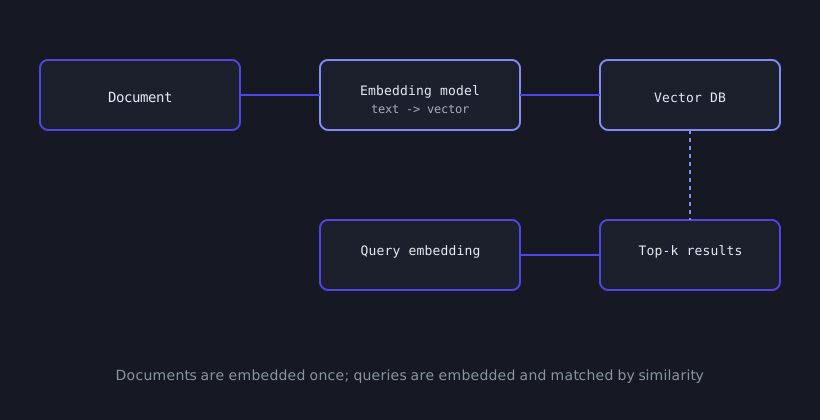
The core workflow
- Embed each document chunk into a vector using an embedding model.
- Store the vector alongside the original text (and metadata) in a vector database.
- Embed the incoming user query the same way.
- Search for the k nearest stored vectors — typically by cosine similarity or dot product.
- Feed the retrieved text into the LLM’s prompt alongside the user’s question.
from openai import OpenAIimport chromadb
client = OpenAI()db = chromadb.PersistentClient(path="./vector-store")collection = db.get_or_create_collection("docs")
def embed(text: str) -> list[float]:    response = client.embeddings.create(model="text-embedding-3-small", input=text)    return response.data[0].embedding
chunks = ["Refunds are processed within 5 business days.", "Cancel anytime from account settings."]collection.add( ids=[f"chunk-{i}" for i in range(len(chunks))], embeddings=[embed(c) for c in chunks], documents=chunks,)query = "how do I get my money back"results = collection.query( query_embeddings=[embed(query)], n_results=3,)context = "\n".join(results["documents"][0]) # feed this into the LLM promptSame idea, two popular clients
import chromadb
client = chromadb.PersistentClient(path="./vector-store")collection = client.get_or_create_collection("docs")collection.add(ids=["1"], embeddings=[[0.1, 0.2, 0.3]], documents=["hello world"])results = collection.query(query_embeddings=[[0.1, 0.2, 0.3]], n_results=1)
from pinecone import Pinecone
pc = Pinecone(api_key="...")index = pc.Index("docs")index.upsert(vectors=[("1", [0.1, 0.2, 0.3], {"text": "hello world"})])results = index.query(vector=[0.1, 0.2, 0.3], top_k=1, include_metadata=True)Picking a vector database
| Option | Good for |
|---|---|
| Chroma | Local prototyping, embedded in your app process |
| Pinecone / Weaviate Cloud | Managed, scales without you operating infrastructure |
| pgvector | You already run Postgres and want one less moving part |
| FAISS | Pure in-memory similarity search, no server at all |
A common pitfall: chunk size
Chunks that are too large dilute the embedding (mixing multiple topics into one vector); chunks that are too small lose context. 200–500 tokens per chunk, with some overlap between adjacent chunks, is a reasonable starting point before you start measuring retrieval quality directly.