 Sho
Sho6. Understanding `@SpringBootApplication`
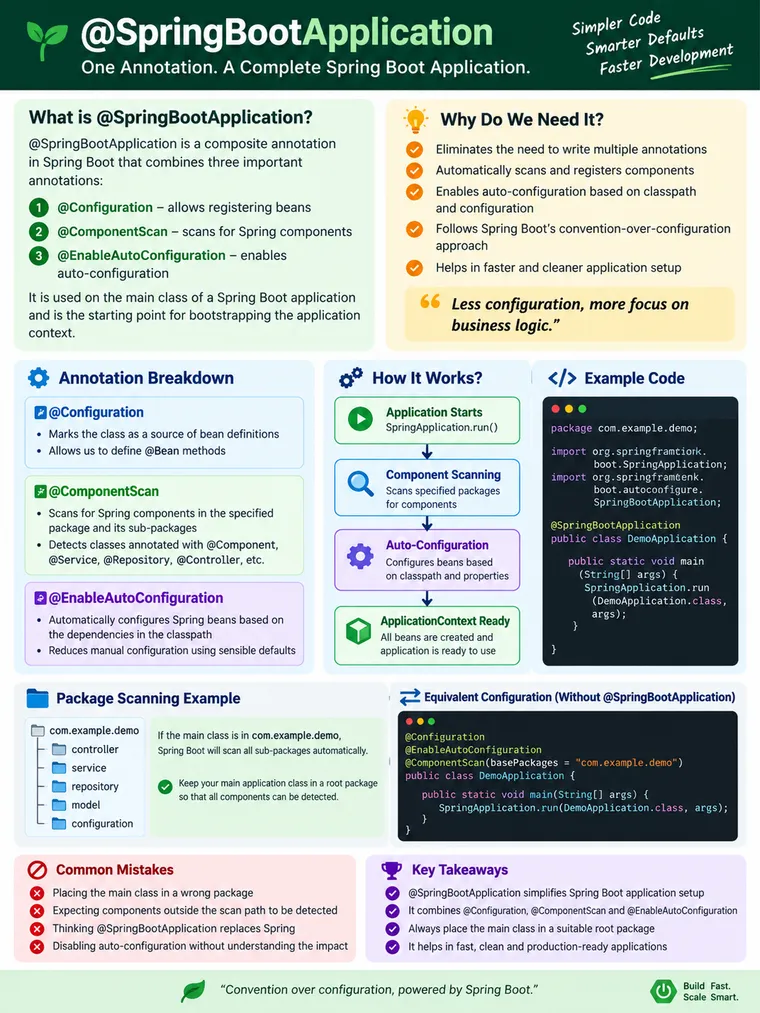
Understanding @SpringBootApplication: The Starting Point of a Spring Boot Application
Meta Description:
Learn how @SpringBootApplication works internally, its three core capabilities, startup flow, component scanning, auto-configuration, and best practices.
@SpringBootApplication: One Annotation Behind a Spring Boot Application
When developers start learning Spring Boot, one of the first pieces of code they see is:
@SpringBootApplicationpublic class MyApplication {
    public static void main(String[] args) {        SpringApplication.run(MyApplication.class, args);    }}
It looks simple.
But for an experienced developer, several important questions immediately come to mind:
- What exactly does
@SpringBootApplicationdo? - Why do we need it?
- Is it the same as
@Configuration? - How does component scanning happen?
- Where does auto-configuration come into the picture?
- What is the difference between
@SpringBootApplicationandSpringApplication.run()? - Why does the package containing the main class matter?
- Does this annotation actually start the application?
Understanding these questions gives you a much stronger mental model of Spring Boot than simply memorizing annotations.
1. The Problem Before @SpringBootApplication
Before Spring Boot became the standard way of building Spring applications, application configuration was often more explicit.
A typical application could have a separate configuration class:
@Configuration@ComponentScan("com.example")@PropertySource("classpath:application.properties")public class AppConfig {}And the application would explicitly create the Spring container:
public static void main(String[] args) {
    ApplicationContext context =            new AnnotationConfigApplicationContext(AppConfig.class);
    Robot robot = context.getBean(Robot.class);
    robot.walk(10);}
There is nothing inherently wrong with this approach.
In fact, explicit configuration is still useful in many situations.
The problem appears when an application becomes larger.
You may need to configure:
- component scanning
- database infrastructure
- transaction management
- web infrastructure
- message converters
- validation
- JSON processing
- security infrastructure
- external configuration
- framework integrations
A lot of this configuration is infrastructure rather than business logic.
Spring Boot’s goal is to reduce this configuration burden through conventions, auto-configuration, starters, and sensible defaults.
2. What Is @SpringBootApplication?
@SpringBootApplication is a composed annotation that acts as the primary configuration entry point for a Spring Boot application.
Conceptually, it brings together three major capabilities:
@SpringBootApplication │ ├── @SpringBootConfiguration │ ├── @EnableAutoConfiguration │ └── @ComponentScanThis is one of the most important things to understand about Spring Boot.
However, there is a small but important technical detail.
It is more accurate to say:
@SpringBootApplicationincludes@SpringBootConfiguration,@EnableAutoConfiguration, and@ComponentScan.
@SpringBootConfiguration is Spring Boot’s specialized configuration annotation and is itself based on Spring’s @Configuration mechanism.
So, for practical understanding:
@SpringBootApplication ↓Application configuration +Component scanning +Auto-configuration3. Understanding the Three Pieces
Let’s understand each capability separately.
3.1 @SpringBootConfiguration
@SpringBootConfiguration identifies the main configuration class of a Spring Boot application.
Conceptually:
@SpringBootConfigurationpublic class MyApplication {}It is closely related to Spring’s standard:
@ConfigurationThe important point is that Spring Boot uses @SpringBootConfiguration as a recognizable application configuration entry point, including for test configuration discovery.
You normally don’t write it yourself because:
@SpringBootApplicationalready provides it.
4. @ComponentScan
The second major capability is component scanning.
Consider this project:
com.example.shop│├── ShopApplication.java│├── controller│ └── OrderController.java│├── service│ └── OrderService.java│├── repository│ └── OrderRepository.java│└── model └── Order.javaSuppose the application class is:
package com.example.shop;
@SpringBootApplicationpublic class ShopApplication {
    public static void main(String[] args) {        SpringApplication.run(ShopApplication.class, args);    }}
By default, component scanning starts from the package containing ShopApplication and searches its subpackages.
So Spring can discover components such as:
@Component@Service@Repository@Controller@RestControllerFor example:
@Servicepublic class OrderService {}Spring can discover this class because:
com.example.shop │ ├── controller ├── service ├── repository └── modelThe application class is located at the root.
5. Why Package Structure Matters
This is one of the most important practical concepts for experienced developers.
Suppose you accidentally structure your application like this:
com.example.application│└── ShopApplication.java
com.example.services│└── OrderService.java
The service is outside the normal component-scan hierarchy.
You may then encounter:
NoSuchBeanDefinitionExceptionor an error such as:
No qualifying bean of type 'OrderService' availableThe problem may not be the service itself.
The problem may simply be:
Spring never discovered the class.
A recommended structure is:
com.example.shop│├── ShopApplication.java│├── controller├── service├── repository├── configuration└── modelThink of the main application class as the root of your Spring application’s discovery tree.
6. @EnableAutoConfiguration
Now we reach one of the most powerful parts of Spring Boot.
@EnableAutoConfigurationThis tells Spring Boot to consider applying configuration based on:
- dependencies available on the classpath
- application properties
- existing beans
- conditional configuration rules
- the application’s environment
For example, suppose your application includes web dependencies.
Spring Boot can detect the relevant web infrastructure and configure many common components automatically.
Similarly, when database-related dependencies are available and appropriate properties are configured, Boot can provide database infrastructure automatically.
The key idea is:
Spring Boot does not blindly configure everything. Auto-configuration is conditional.
7. Auto-Configuration Is Not Magic
Consider a simplified example.
Your application has a database dependency:
Application │ ├── Spring Boot │ ├── JDBC dependencies │ └── Database driverSpring Boot sees the relevant classes on the classpath.
It then evaluates auto-configuration conditions.
Conceptually:
Is JDBC available? │ ├── No → Don't configure JDBC infrastructure │ └── Yes ↓ Are required properties available? ↓ Is a DataSource already defined? │ ├── Yes → Back off where appropriate │ └── No → Apply Boot's default configurationThis is why experienced Spring Boot developers should think of auto-configuration as:
Conditional infrastructure configuration driven by the application’s environment.
Not:
“Spring Boot automatically creates everything.”
8. The Relationship Between Component Scanning and Auto-Configuration
These two concepts are often confused.
They solve different problems.
Component Scanning
Discovers your application’s components.
Your source code ↓@Component@Service@Repository@Controller ↓Spring BeanAuto-Configuration
Provides framework/infrastructure configuration when appropriate.
Dependencies +Properties +Conditions ↓Auto-Configuration ↓Infrastructure BeansSo:
@ComponentScan      ↓Find my application components
@EnableAutoConfiguration      ↓Configure required infrastructure
This distinction becomes extremely useful when troubleshooting Spring Boot applications.
9. @SpringBootApplication vs SpringApplication.run()
Another common beginner misconception is that:
@SpringBootApplicationstarts the application.
It doesn’t do that by itself.
There are two separate responsibilities.
@SpringBootApplication
Defines the application’s primary configuration entry point and enables:
ConfigurationComponent ScanningAuto-ConfigurationSpringApplication.run()
Bootstraps the application.
SpringApplication.run(MyApplication.class, args);Conceptually:
@SpringBootApplication        ↓Defines application configuration
SpringApplication.run()        ↓Bootstraps Spring Boot        ↓Creates ApplicationContext        ↓Processes configuration        ↓Discovers components        ↓Applies auto-configuration        ↓Creates beans        ↓Starts required infrastructure        ↓Application becomes ready
This distinction is important.
10. What Happens When the Application Starts?
Consider:
@SpringBootApplicationpublic class OrderApplication {
    public static void main(String[] args) {
        SpringApplication.run(OrderApplication.class, args);    }}
At a high level, the startup process looks like this:
main() │ ▼SpringApplication.run() │ ▼Create and prepare ApplicationContext │ ▼Process application configuration │ ├───────────────┐ ▼ ▼Component Auto-Scanning Configuration │ │ ▼ ▼Application InfrastructureBeans Beans │ │ └───────┬───────┘ ▼ Bean creation │ ▼ ApplicationContext ready │ ▼ Application runningThis is obviously a simplified representation—the actual startup pipeline involves many more phases and extension points—but it gives you the right mental model.
11. A Minimal Real-World Example
Consider a simple order-management application.
Application class
package com.example.orders;
import org.springframework.boot.SpringApplication;import org.springframework.boot.autoconfigure.SpringBootApplication;
@SpringBootApplicationpublic class OrderApplication {
    public static void main(String[] args) {        SpringApplication.run(OrderApplication.class, args);    }}
Service
package com.example.orders.service;
import org.springframework.stereotype.Service;
@Servicepublic class OrderService {
    public String createOrder() {        return "Order created";    }}
Controller
package com.example.orders.controller;
import org.springframework.web.bind.annotation.GetMapping;import org.springframework.web.bind.annotation.RestController;
@RestControllerpublic class OrderController {
    private final OrderService orderService;
    public OrderController(OrderService orderService) {        this.orderService = orderService;    }
    @GetMapping("/orders")    public String createOrder() {        return orderService.createOrder();    }}
Notice what we did not manually configure.
We didn’t explicitly create:
ApplicationContextComponent scannerWeb infrastructureController registrationService registrationHTTP server configurationSpring Boot handles the common infrastructure through its startup and auto-configuration mechanisms.
12. What Happens Without @SpringBootApplication?
You can build a Spring Boot application without using @SpringBootApplication.
For example, you can explicitly configure the individual capabilities:
@Configuration@EnableAutoConfiguration@ComponentScan("com.example.orders")public class OrderApplication {
    public static void main(String[] args) {        SpringApplication.run(OrderApplication.class, args);    }}
This demonstrates something important:
@SpringBootApplicationis a convenience/composed entry point, not a magical requirement of the Spring container.
You can customize the individual annotations when you have a specific reason.
For most applications, however, the composed annotation is cleaner and easier to understand.
13. Why Does Spring Boot Prefer One Main Application Class?
A typical Spring Boot project has one primary application entry point:
com.example.orders│├── OrderApplication.java│├── controller├── service├── repository├── configuration└── modelThis provides a predictable starting point for:
- component scanning
- auto-configuration
- application startup
- testing
- team onboarding
When a developer joins an unfamiliar project, finding:
@SpringBootApplicationimmediately gives them a strong starting point for understanding the application.
That is a significant engineering benefit.
14. Can We Customize Component Scanning?
Yes.
For example:
@SpringBootApplication( scanBasePackages = "com.example.orders")public class OrderApplication {}You can explicitly define the packages to scan.
But don’t customize scanning unnecessarily.
A clean package structure is usually preferable to configuring large lists of packages.
Prefer
com.example.orders├── OrderApplication├── controller├── service├── repository└── modelover:
@SpringBootApplication( scanBasePackages = { "com.example.orders.controller", "com.example.orders.service", "com.company.shared", "com.company.common", "com.other.package" })unless there is a genuine architectural reason.
15. Can We Exclude Auto-Configuration?
Yes.
Spring Boot allows specific auto-configurations to be excluded when necessary.
For example:
@SpringBootApplication( exclude = SomeAutoConfiguration.class)public class OrderApplication {}This is useful when:
- you don’t want a particular auto-configuration
- you provide your own infrastructure
- an auto-configuration conflicts with your architecture
- a dependency is present but its default configuration isn’t appropriate
However, exclusions should be deliberate.
A developer should first understand:
Why was this auto-configuration selected?What condition triggered it?What configuration do I want instead?rather than randomly excluding classes until the application starts.
16. What If I Define My Own Bean?
This is where Spring Boot’s auto-configuration becomes especially interesting.
Suppose Boot provides some infrastructure automatically.
You decide to provide your own implementation.
Conceptually:
Spring Boot Auto-Configuration │ ▼"Should I create the default bean?" │ ▼ Existing bean? / \ Yes No │ │ ▼ ▼ Back off Create defaultMany Boot auto-configurations use conditional mechanisms such as:
@ConditionalOnMissingBeanThis allows your explicit configuration to take precedence in appropriate cases.
This behavior is commonly described as:
Auto-configuration should back off when you provide your own configuration.
That is one of the most important principles behind Spring Boot customization.
17. @SpringBootApplication and Dependency Injection
It is important not to misunderstand the annotation.
@SpringBootApplication does not mean:
Create every object in my project.Instead, it establishes the configuration and scanning environment in which Spring’s IoC container can discover, configure, and manage beans.
For example:
@Servicepublic class PaymentService {}The component is discovered through component scanning.
Then Spring manages it as a bean.
Another class can receive it through dependency injection:
@RestControllerpublic class PaymentController {
    private final PaymentService paymentService;
    public PaymentController(PaymentService paymentService) {        this.paymentService = paymentService;    }}
The overall chain becomes:
@SpringBootApplication ↓@ComponentScan ↓Find @Service ↓Register PaymentService ↓Create PaymentService bean ↓Inject into PaymentController18. @SpringBootApplication in a Production Application
Imagine a large enterprise application:
Order Management System│├── REST APIs├── Authentication├── Database├── Messaging├── Caching├── Monitoring└── Business ServicesWithout a consistent application entry point, understanding how the application starts can become unnecessarily difficult.
With Spring Boot:
@SpringBootApplication │ ├── Application configuration ├── Component discovery └── Auto-configuration │ ▼ SpringApplication.run() │ ▼ ApplicationContext │ ┌────────┴────────┐ ▼ ▼ Business Beans Infrastructure │ │ └────────┬────────┘ ▼ ApplicationThis standardization is particularly valuable in large teams.
Developers know where to start.
Operations and platform teams have predictable application startup behavior.
Test infrastructure can locate the main configuration.
And developers can focus more on application behavior rather than repeatedly wiring common infrastructure.
19. Common Problems and Troubleshooting
Problem 1: Bean Not Found
Example:
NoSuchBeanDefinitionExceptionFirst check:
Is the class annotated with @Component/@Service/etc.? ↓Is it inside the component-scan hierarchy? ↓Is the application class located in the correct root package?Problem 2: Application Starts but Expected Configuration Is Missing
Check:
- Is the required dependency present?
- Is the required property configured?
- Did an auto-configuration condition fail?
- Did you explicitly define a conflicting bean?
- Was auto-configuration excluded?
Problem 3: Unexpected Auto-Configuration
Don’t immediately assume Spring Boot is behaving incorrectly.
Investigate:
Which dependency introduced the configuration? ↓Which auto-configuration matched? ↓Which conditions evaluated to true? ↓Which beans were created?Spring Boot provides diagnostic mechanisms that can help developers understand why auto-configuration was applied or skipped.
This is an important skill for experienced Spring Boot developers.
20. Common Misconceptions
Misconception 1
“
@SpringBootApplicationis just another annotation.”
Reality:
It is the primary composed configuration entry point for most Spring Boot applications.
Misconception 2
“
@SpringBootApplicationstarts the application.”
Reality:
The annotation configures the application entry point. SpringApplication.run() performs the application bootstrap.
Misconception 3
“Component scanning and auto-configuration are the same.”
Reality:
Component Scan    ↓Find application components
Auto-Configuration    ↓Configure framework infrastructure
Misconception 4
“Spring Boot automatically configures everything.”
Reality:
Auto-configuration is conditional and influenced by dependencies, properties, existing beans, and other conditions.
Misconception 5
“The main class can be anywhere.”
Reality:
Its package location matters because it establishes the default component-scanning boundary.
21. Without vs With Spring Boot
| Concern | Traditional Spring approach | Spring Boot approach |
|---|---|---|
| Application configuration | More explicit | Convention-based |
| Component scanning | Explicitly configured | Enabled through @SpringBootApplication |
| Infrastructure configuration | Often manual | Auto-configured when conditions match |
| Application startup | Explicit context creation possible | SpringApplication.run() |
| Package convention | Flexible | Root package structure strongly recommended |
| Common defaults | Developer-defined | Spring Boot provides sensible defaults |
| Customization | Explicit configuration | Override/customize Boot defaults |
| Startup entry point | Application-specific | Standardized |
The important point is not that the traditional approach is “bad.”
Rather:
Spring Boot provides a standardized and convention-driven way to reduce repetitive application infrastructure configuration.
22. An Experienced Developer’s Mental Model
Don’t memorize:
@SpringBootApplication= three annotationsalone.
Instead, remember the bigger picture:
@SpringBootApplication │ ┌────────────────┼────────────────┐ │ │ │ ▼ ▼ ▼ Application Component Auto- Configuration Scanning Configuration │ │ │ │ ▼ ▼ │ Your Beans Infrastructure │ │ │ └────────────────┴────────────────┘ │ ▼ Spring Application Context │ ▼ SpringApplication.run() │ ▼ Application ReadyThis mental model is much more useful when debugging a real application.
23. Key Takeaways
1. @SpringBootApplication is a composed annotation
It brings together:
@SpringBootConfiguration@EnableAutoConfiguration@ComponentScan2. Component scanning discovers your application components
@Controller@Service@Repository@Componentare discovered according to the scanning configuration.
3. Auto-configuration configures infrastructure
Spring Boot uses dependencies, properties, existing beans, and conditions to decide what configuration should be applied.
4. Package placement matters
The main application class should generally live in a root package above your application’s components.
5. SpringApplication.run() and @SpringBootApplication have different responsibilities
@SpringBootApplication        ↓Defines application configuration behavior
SpringApplication.run()        ↓Bootstraps the application
6. Spring Boot doesn’t remove customization
It provides sensible defaults.
You can still override, customize, or exclude configuration when your application’s requirements differ from those defaults.
Final Mental Model
If you remember only one diagram from this article, remember this:
@SpringBootApplication │ ┌──────────────┼──────────────┐ ▼ ▼ ▼ Configuration Component Scan Auto-Configuration │ │ │ │ ▼ ▼ │ Application Beans Infrastructure │ │ │ └──────────────┴──────────────┘ │ ▼ ApplicationContext │ ▼ SpringApplication.run() │ ▼ Application ReadyThat is the real purpose of @SpringBootApplication.
It provides a standard starting point for configuring a Spring Boot application, discovering application components, and enabling Spring Boot’s conditional auto-configuration model—while SpringApplication.run() takes that configuration and bootstraps the application.
Once this mental model is clear, many Spring Boot features that initially look like “magic” become much easier to understand and troubleshoot.