 Sho
Sho1. Python Object Serialization: Pickle vs JSON vs YAML
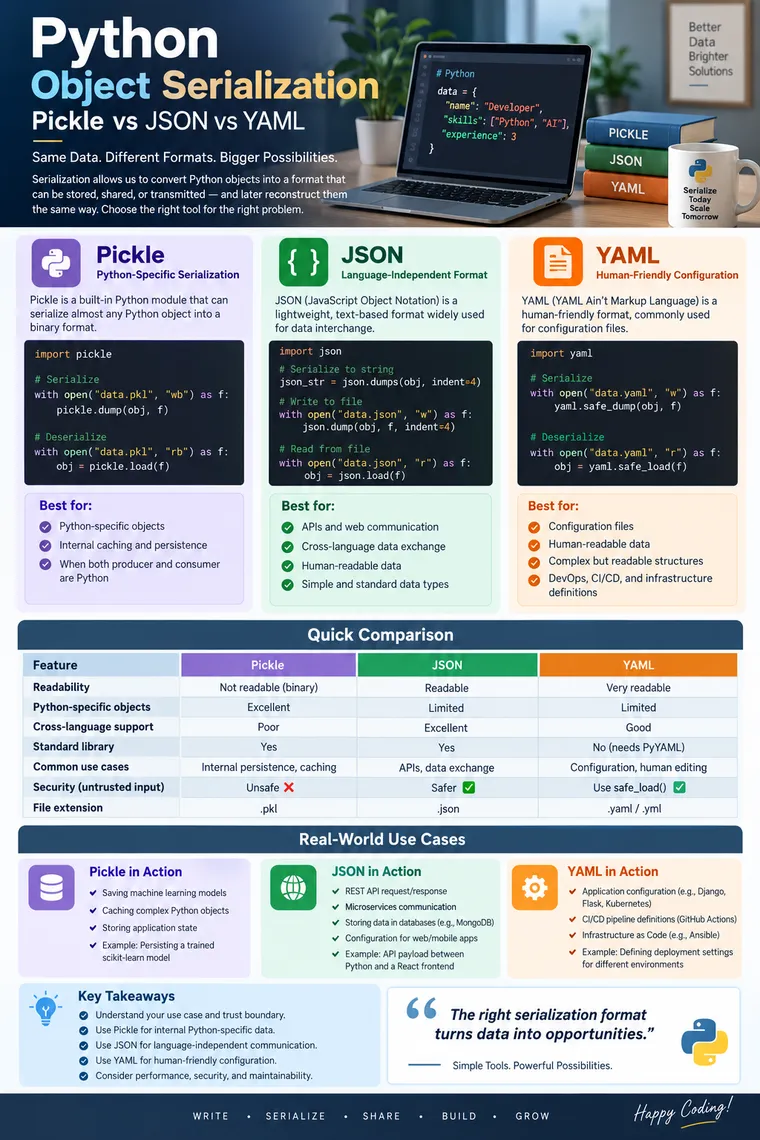
Python Object Serialization: Pickle vs JSON vs YAML — A Practical Guide for Real-WorldDevelopment
When a Python application runs, its data usually exists as Python objects in memory:
employee = { "id": 101, "name": "Ravi", "salary": 85000, "skills": ["Python", "Django", "AWS"]}But applications rarely keep data in memory forever.
At some point, we may need to:
- Save an object to a file
- Send data between services
- Store application configuration
- Cache data
- Transfer information between different programming languages
- Persist application state
- Exchange data through APIs
This is where object serialization becomes important.
In this article, we’ll understand serialization using three popular approaches:
Python Object │ ├──────────► Pickle │ ├──────────► JSON │ └──────────► YAMLThe goal isn’t simply to learn dump() and load(). The important engineering question is:
Which serialization format should you use for a particular problem?
1. What Is Serialization?
Serialization is the process of converting an in-memory object into a format that can be stored or transmitted.
For example:
Python Object │ │ Serialization ▼Stored / Transferable RepresentationDeserialization is the reverse:
Stored / Transferable Representation │ │ Deserialization ▼Python ObjectThe concepts of serialization and deserialization are also commonly referred to as marshalling/unmarshalling; Python’s pickle mechanism is also associated with pickling/unpickling.
Simple example
employee = { "id": 101, "name": "Ravi"}Serialization might produce:
{"id": 101, "name": "Ravi"}After deserialization:
{ "id": 101, "name": "Ravi"}The data has crossed a storage or communication boundary while preserving its logical structure.
2. Why Do We Need Serialization?
Imagine a Python application processing customer information.
During execution:
Application │ ▼Python Objects │ ├── Database ├── Cache ├── File ├── Message Queue └── REST APIPython objects cannot always be sent directly through these boundaries.
Serialization converts them into a suitable representation.
Common real-world scenarios
Caching
Python Object ↓Serialize ↓Cache ↓DeserializeAPI communication
Python Service ↓ JSON ↓Java / JavaScript / Go / etc.Configuration
Application Configuration ↓ YAML ↓Configuration FilePython-specific persistence
Python Object ↓ Pickle ↓Binary File3. Pickle: Python-Specific Object Serialization
Python provides the pickle module as part of its standard library.
It can serialize Python objects into a byte stream and later reconstruct them. The core operations are:
pickle.dump()pickle.load()The basic dump(object, file) and load(file) model is demonstrated in the reference material.
4. Basic Pickle Example
Consider a custom Python class:
import pickle

class Employee:
    def __init__(self, employee_id, name, salary):        self.employee_id = employee_id        self.name = name        self.salary = salary

employee = Employee(    101,    "Ravi",    85000)
with open("employee.pkl", "wb") as file:    pickle.dump(employee, file)
Notice:
"wb"The file is opened in binary write mode because pickle produces a binary representation.
The reference example similarly serializes a custom Employee object using pickle.dump() into a binary file.
5. Deserializing a Pickle Object
import pickle
with open("employee.pkl", "rb") as file:    employee = pickle.load(file)
print(employee.name)print(employee.salary)
Conceptually:
Employee Object │ │ pickle.dump() ▼employee.pkl │ │ pickle.load() ▼Employee ObjectThe important advantage here is that pickle can reconstruct Python-specific object structures rather than merely returning a generic dictionary.
6. Serializing Multiple Objects
You can serialize multiple objects sequentially into the same file.
import pickle
employees = [    {"id": 101, "name": "Ravi"},    {"id": 102, "name": "Anita"},    {"id": 103, "name": "Kiran"}]
with open("employees.pkl", "wb") as file:
    for employee in employees:        pickle.dump(employee, file)
They can subsequently be read until the end of the stream:
import pickle
with open("employees.pkl", "rb") as file:
    while True:
        try:            employee = pickle.load(file)            print(employee)
        except EOFError:            break
Reading multiple objects until EOFError is also demonstrated in the reference material.
7. The Biggest Pickle Security Rule
This is one of the most important points for experienced developers.
Never unpickle data from an untrusted source.
Do not assume a .pkl file is safe simply because it contains data.
Pickle is capable of reconstructing Python objects in ways that can execute code during deserialization.
Therefore:
Trusted internal data ↓ Pickle ✓but:
User uploadExternal APIUnknown fileInternet download ↓ Pickle ✗For APIs and data exchanged with external systems, JSON is usually a much safer choice.
8. When Should You Use Pickle?
Pickle is a good choice when:
- Both producer and consumer are Python
- You need to preserve Python-specific object structures
- You’re implementing internal caching
- You’re persisting trusted internal Python objects
- Interoperability with other languages isn’t required
Example
A machine-learning application may temporarily cache a trusted Python object internally.
Python Application │ ▼Python Object │ ▼Pickle │ ▼Internal Cache9. When Shouldn’t You Use Pickle?
Avoid pickle when:
- Data needs to be consumed by JavaScript
- A Java service must consume it
- You’re designing a public API
- The serialized data may come from untrusted sources
- Long-term language-independent storage is required
- Human readability matters
This is one of the most common interview distinctions:
Pickle is Python-centric; JSON is designed for interoperability.
10. JSON: The Language-Independent Option
JSON means:
JavaScript Object Notation
Although its name comes from JavaScript, JSON is widely used as a data interchange format across programming languages.
The reference material highlights JSON’s interoperability, human readability, and lightweight nature.
A typical JSON object looks like:
{ "id": 101, "name": "Ravi", "salary": 85000, "active": true}11. Python Types vs JSON Types
A useful mapping to remember:
| Python | JSON |
|---|---|
dict | object |
list | array |
str | string |
int | number |
float | number |
True | true |
False | false |
None | null |
The reference material presents these Python-to-JSON mappings, including dictionary/object, list/array, boolean and None/null relationships.
12. JSON Serialization with dumps()
import json
employee = {    "id": 101,    "name": "Ravi",    "salary": 85000,    "skills": [        "Python",        "Django",        "AWS"    ]}
json_string = json.dumps(    employee,    indent=4)
print(json_string)
dumps() converts a Python object into a JSON string.
The reference material uses json.dumps() and demonstrates options such as indentation and sorted keys.
13. dump() vs dumps()
This is a very common interview question.
dumps()
Python object → JSON string
json_string = json.dumps(employee)dump()
Python object → JSON file
with open("employee.json", "w") as file: json.dump(employee, file, indent=4)Remember:
dumps → stringdump → file14. JSON Deserialization
For a JSON string:
employee = json.loads(json_string)For a JSON file:
with open("employee.json", "r") as file: employee = json.load(file)Again:
loads → string → Python objectload → file → Python objectThese distinctions are explicitly covered in the reference material.
15. Real-World Example: REST API
Suppose an e-commerce service is implemented in Python.
The client sends:
GET /api/products/101The server might respond with:
{ "id": 101, "name": "Laptop", "price": 75000, "available": true}The client might be:
ReactAngularMobile AppJava ApplicationPython ApplicationThey can all understand JSON.
That’s why JSON is so dominant in REST APIs.
16. JSON and Custom Python Classes
This is where many beginners get confused.
Suppose:
class Employee:
    def __init__(self, employee_id, name):        self.employee_id = employee_id        self.name = name
You cannot simply expect:
json.dumps(employee)to automatically recreate the same custom Python object during deserialization.
A common approach is to convert the object’s attributes to a dictionary:
employee_dict = employee.__dict__
json_string = json.dumps(employee_dict)
print(json_string)
The reference material demonstrates this approach using __dict__, then reconstructing the custom object explicitly after json.load().
For example:
data = json.loads(json_string)
employee = Employee(    data["employee_id"],    data["name"])
So the transformation becomes:
Employee Object ↓__dict__ ↓Dictionary ↓JSONand back:
JSON ↓Dictionary ↓Employee(...) ↓Employee Object17. YAML: Designed for Human-Friendly Data
YAML is another serialization/data representation format.
One of its biggest strengths is readability.
For example:
employee: id: 101 name: Ravi salary: 85000 skills: - Python - Django - AWSCompare that with JSON:
{ "employee": { "id": 101, "name": "Ravi", "salary": 85000, "skills": [ "Python", "Django", "AWS" ] }}Both represent structured data, but YAML is often easier for humans to edit.
The reference material describes YAML as a lightweight, human-understandable alternative to JSON and notes its readability.
18. Installing a YAML Library
Unlike JSON, YAML support is not part of Python’s standard library.
A commonly used implementation is PyYAML.
Install it with:
pip install pyyamlThen:
import yaml19. YAML Serialization
import yaml
employee = {    "id": 101,    "name": "Ravi",    "salary": 85000,    "skills": [        "Python",        "Django",        "AWS"    ]}
yaml_string = yaml.safe_dump(employee)
print(yaml_string)
The reference material demonstrates YAML serialization using dump() and deserialization using safe_load().
20. Writing YAML to a File
import yaml
employee = {    "id": 101,    "name": "Ravi",    "salary": 85000}
with open("employee.yaml", "w") as file:    yaml.safe_dump(employee, file)
21. Reading YAML Safely
This is extremely important.
Prefer:
yaml.safe_load()rather than using unrestricted loading for untrusted YAML.
import yaml
with open("employee.yaml", "r") as file:    employee = yaml.safe_load(file)
print(employee)
The reference material itself notes that the older load() approach is deprecated in the discussed context and recommends safe_load().
22. YAML vs JSON
A simple way to think about them:
JSON ↓Machine-to-machine communication
YAML ↓Human-friendly configuration
This isn’t an absolute rule, but it’s a useful engineering guideline.
YAML is particularly common for:
- Application configuration
- CI/CD pipelines
- Infrastructure definitions
- Deployment configuration
- Kubernetes manifests
- Automation tools
Example:
database:  host: db.internal  port: 5432  name: employee_db
application:  debug: false  workers: 4
A developer can usually understand this configuration immediately.
23. Pickle vs JSON vs YAML
This is the comparison you should remember for interviews.
| Feature | Pickle | JSON | YAML |
|---|---|---|---|
| Python-specific objects | Excellent | Limited | Limited |
| Cross-language support | Poor | Excellent | Good |
| Human readability | Poor | Good | Excellent |
| Standard Python library | Yes | Yes | No |
| API communication | Usually no | Excellent | Possible |
| Configuration | Rarely | Possible | Excellent |
| Binary representation | Yes | No | No |
| Security with untrusted input | Unsafe | Safer | Use safe_load() |
| Custom Python object preservation | Excellent | Requires conversion | Usually requires explicit mapping |
| Typical extension | .pkl | .json | .yaml / .yml |
24. The Most Important Decision Rule
When choosing a serialization mechanism, ask these questions:
Question 1: Is everything Python?
If yes, pickle may be appropriate.
Python ↕Pickle ↕PythonQuestion 2: Do different languages need to communicate?
Prefer JSON.
Python ↕ JSON ↕Java / JS / Go / C# / etc.Question 3: Is this primarily configuration?
YAML is often an excellent choice.
Developer ↓ YAML ↓Configuration25. Performance and Complexity
Let’s say the serialized data contains N bytes/elements.
Serialization generally requires visiting the data being encoded.
Therefore, a useful high-level model is:
Serialization Time → O(N)Deserialization Time → O(N)for straightforward structures.
Memory usage depends heavily on the object structure, representation, implementation, and whether the entire serialized result is materialized in memory.
For json.dumps():
Object ↓JSON stringthe resulting string itself requires memory proportional to its serialized size:
Additional Space ≈ O(N)Similarly, json.loads() constructs the resulting Python object in memory.
For file-oriented operations, buffering and the underlying I/O layer also influence real-world memory consumption.
Important interview clarification
Don’t claim:
“Pickle is always faster than JSON.”
or:
“JSON always consumes less memory.”
Those are oversimplifications.
Actual performance depends on:
- Object structure
- Serialization format
- Protocol/version
- Data types
- Implementation
- CPU
- Storage
- Network
- Compression
- Dataset size
Benchmark your actual workload when performance matters.
26. Pickle Performance
Pickle is optimized around Python object serialization and can be efficient for Python-native structures.
For an object graph containing N logical elements:
Time → approximately O(N)Additional memory may grow with the size of the serialized representation and object graph.
A major advantage is that pickle can preserve considerably more Python-specific structure than JSON.
27. JSON Performance
JSON serialization:
json.dumps(data)typically requires traversing the structure.
Conceptually:
Time → O(N)and creating the resulting JSON string requires memory proportional to its size.
JSON can become CPU-intensive for very large or deeply nested payloads because encoding and decoding involve parsing and text generation.
28. YAML Performance
YAML prioritizes expressiveness and human readability rather than being the fastest interchange format.
For typical structured data:
Time → approximately O(N)but YAML parsing can involve more work than straightforward JSON parsing because YAML supports richer syntax and features.
Therefore, if an API requires very high-throughput serialization, YAML would generally not be the first format I’d choose.
29. Pros and Cons of Pickle
Advantages
- Python-native
- Can serialize many Python object types
- Convenient for internal persistence
- Preserves object structure
- Built into Python
Disadvantages
- Python-specific
- Not suitable for language interoperability
- Not human-readable
- Unsafe for untrusted input
- Long-term compatibility requires careful versioning
30. Pros and Cons of JSON
Advantages
- Language independent
- Human-readable
- Excellent for REST APIs
- Widely supported
- Easy to debug
- Standard Python library
Disadvantages
- Limited native type system
- Doesn’t automatically reconstruct arbitrary Python classes
- Text representation can be larger than compact binary formats
- Large payloads can have parsing overhead
31. Pros and Cons of YAML
Advantages
- Highly readable
- Excellent for configuration
- Supports nested structures naturally
- Comments are supported
- More expressive than basic JSON syntax
Disadvantages
- Requires an external Python library
- Parsing can be more complex
- Not usually the first choice for high-volume API payloads
- Unsafe loading must be avoided for untrusted YAML
- YAML’s flexibility can sometimes introduce configuration ambiguity
32. Real-World Architecture Example
Imagine a product company has this architecture:
┌───────────────┐ │ React Frontend│ └───────┬───────┘ │ JSON │ ▼ ┌───────────────┐ │ Python API │ └───────┬───────┘ │ ┌───────────┼───────────┐ │ │ │ JSON Pickle YAML │ │ │ ▼ ▼ ▼ APIs Cache ConfigA senior engineer shouldn’t ask:
“Which format is best?”
The better question is:
“Best for what boundary?”
33. A Practical Product-Company Example
Suppose we are developing an order-processing platform.
API request
Use JSON:
{ "order_id": 1001, "customer_id": 501, "items": [ { "product_id": 10, "quantity": 2 } ]}Why?
Because:
MobileWebPythonJavaNode.jscan all consume it.
Internal Python cache
Suppose the application maintains a trusted Python-specific object internally.
Pickle may be considered:
Python Object ↓Internal Cacheprovided the security and compatibility requirements are understood.
Application configuration
Use YAML:
application:  workers: 8  timeout: 30
database:  host: db.internal  port: 5432
because developers and DevOps engineers need to read and maintain the configuration.
34. A Common Interview Trap
Interviewer:
“Can JSON serialize any Python object?”
Weak answer:
“Yes.”
Better answer:
“No. JSON supports a limited set of data types such as dictionaries, lists, strings, numbers, booleans and null-like values. For custom Python objects, we normally convert them into a JSON-compatible structure or provide custom encoding/decoding logic.”
The reference material also demonstrates that JSON loading returns a dictionary rather than automatically reconstructing the original custom Employee object.
35. Another Interview Trap: dump vs dumps
Remember this simple rule:
dump ↓file
dumps ↓string
load ↓file
loads ↓string
So:
json.dump(data, file)json.dumps(data)
json.load(file)json.loads(string)
This distinction is also explicitly covered in the reference material. Object+Serialization+for+Online.pdfPDF
36. Security: The Senior-Level Perspective
Serialization isn’t just a syntax topic.
It is a trust-boundary problem.
Whenever serialized data crosses a boundary, ask:
Who created this data? ↓Can I trust the source? ↓Can the format execute behavior? ↓Can malicious data exploit deserialization?Pickle
Treat untrusted pickle as dangerous.
YAML
Use safe loading for untrusted YAML:
yaml.safe_load(data)JSON
JSON is primarily data, which makes it much more appropriate for external APIs, although applications must still validate the resulting data.
37. Serialization Versioning
Experienced developers should also think about schema evolution.
Suppose version 1 contains:
{ "name": "Ravi", "salary": 85000}Version 2 adds:
{ "name": "Ravi", "salary": 85000, "department": "Engineering"}Your application needs to handle both versions safely.
This is one reason explicit, stable schemas are valuable for APIs.
With pickle, compatibility can be more tightly coupled to Python classes and application versions.
Therefore:
Serialization format choice is also an architecture and compatibility decision.
38. When Should You Choose What?
Here’s the practical decision matrix.
| Requirement | Recommended |
|---|---|
| Python → Python internal persistence | Pickle |
| Python-specific object graph | Pickle |
| REST API | JSON |
| Microservice communication | JSON |
| Browser communication | JSON |
| Configuration file | YAML |
| Human-maintained configuration | YAML |
| Untrusted external serialized object | Avoid Pickle |
| Untrusted YAML | safe_load() |
| Cross-language long-term data exchange | JSON |
| Human-readable data interchange | JSON/YAML |
| Internal trusted Python cache | Pickle can be considered |
39. What I Would Choose in a Production System
If I’m designing a new product:
API layer
JSONConfiguration
YAMLInternal Python-specific temporary persistence
Pickle — only where the trust and compatibility boundaries are controlledBut I wouldn’t automatically use any of these for every persistence requirement.
For durable business data, I’d normally consider:
DatabaseObject StorageMessage BrokerSpecialized binary formatsdepending on the problem.
Serialization is a mechanism—not a replacement for choosing the right storage architecture.
40. Final Mental Model
The easiest way to remember everything is:
PYTHON OBJECT │ ┌───────────┼───────────┐ │ │ │ ▼ ▼ ▼ PICKLE JSON YAML │ │ │ ▼ ▼ ▼ Python-only APIs/Data Configuration objects exchange / human editing │ │ │ ▼ ▼ ▼ Trusted Cross- Human internal language readable systems systems configsIn one sentence:
Use Pickle when Python-specific object preservation matters, JSON when interoperability matters, and YAML when human-readable configuration matters.
41. Interview Cheat Sheet
Before your interview, remember these points:
Pickle
Python-specificBinaryPowerful object serializationNot human-readableNever trust untrusted pickleJSON
Language-independentText-basedExcellent for APIsHuman-readableLimited native typesYAML
Human-friendlyExcellent for configurationReadableRequires external library in PythonUse safe_load() for untrusted YAMLComplexity
Serialization → approximately O(N)Deserialization → approximately O(N)where N represents the amount of data/structure processed.
Critical security rule
Untrusted Pickle → DON'T LOADUntrusted YAML → safe_load()External API → JSON + validationConclusion
Object serialization looks simple at first:
dump()load()But professional Python development requires understanding much more than those two functions.
You need to understand:
- What serialization actually means
- The difference between serialization and deserialization
- Python-specific serialization with Pickle
- Cross-language serialization with JSON
- Human-readable configuration with YAML
dump()vsdumps()load()vsloads()- Custom object handling
- Security boundaries
- Memory and performance
- Schema evolution
- Production architecture
Most importantly, don’t memorize:
“Pickle vs JSON vs YAML.”
Instead, remember the engineering decision:
Need Python object fidelity?        ↓      Pickle
Need cross-language communication?        ↓       JSON
Need readable configuration?        ↓       YAML
That’s the level of understanding that helps move from “I know Python syntax” to “I can make sound Python architecture decisions.”