 Sho
Sho4. Starter Dependencies and Actuator — From Dependency Complexity to Production Observability
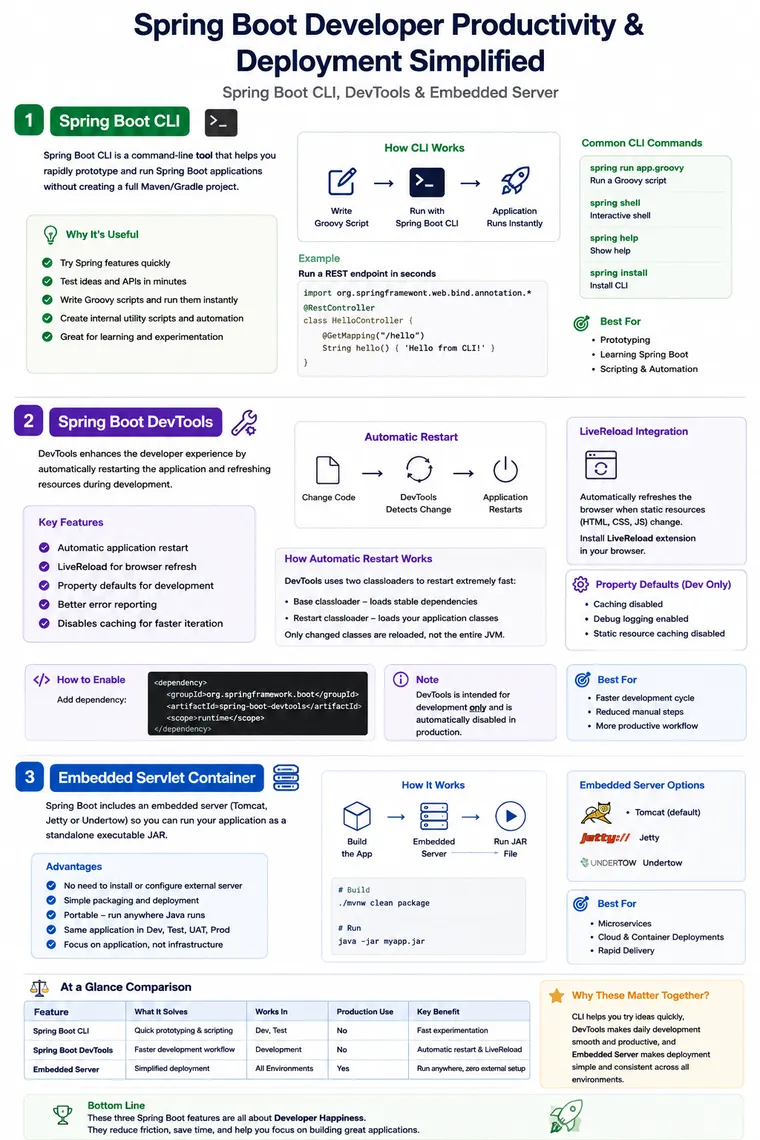
Spring Boot CLI, DevTools and Embedded Server: Making Development and Deployment Simpler
Short Description:
Spring Boot provides more than auto-configuration and starter dependencies. Features such as Spring Boot CLI, DevTools, and embedded servers simplify application development, reduce repetitive setup, and make Spring Boot applications easier to run and deploy.
Spring Boot CLI, DevTools and Embedded Server
When developers first start working with Spring Boot, most attention goes toward features such as Auto-Configuration, Starter Dependencies, and Actuator.
But Spring Boot solves another important engineering problem:
How can developers build, run, modify, test, and deploy applications without repeatedly managing infrastructure around the application?
Consider a normal development day.
You change a Java class.
Then you need to:
- compile the application
- restart the application
- wait for the application to start
- refresh the browser
- test the change
After development is complete, another question appears:
Where should the application server come from?
Traditionally, applications could be deployed to an externally managed server such as Tomcat. That introduces another runtime component to install, configure, maintain, and keep consistent across environments.
Spring Boot addresses these kinds of repetitive tasks through several developer-focused capabilities.
Three useful examples are:
- Spring Boot CLI — quick project creation and command-line interaction
- Spring Boot DevTools — faster development feedback
- Embedded Server — application and web server packaged together
Together, they support a simple idea:
Developers should spend more time building application functionality and less time repeatedly preparing the environment around it.
1. Spring Boot CLI
What problem does it solve?
Imagine that you want to quickly experiment with a Spring Boot idea.
You don’t necessarily want to spend time creating:
- Maven configuration
- Gradle configuration
- project directories
- dependency declarations
- initial application structure
For a full production project, build tools such as Maven or Gradle remain important.
But for quick experimentation and project bootstrapping, a command-line interface can reduce the amount of manual work.
This is where Spring Boot CLI comes in.
Spring Boot CLI is a command-line tool provided by Spring Boot. Current Spring Boot documentation describes commands such as spring init, which can bootstrap a project through Spring Initializr, along with commands such as spring help, spring shell, and password encoding support.
Why is CLI useful?
Think about a developer who wants to test an idea:
“Can I expose a simple REST endpoint with Spring Boot?”
Instead of manually creating the initial project structure, the CLI can help bootstrap the project.
For example:
spring init --dependencies=web my-app.zipThe generated project can then be imported into the developer’s preferred IDE.
The important idea is not the command itself.
The important idea is:
CLI reduces the amount of setup required before you can start experimenting with Spring Boot.
CLI in a Real Development Scenario
Suppose a developer is investigating whether a particular Spring Boot feature will work for a new project.
Without a quick bootstrap mechanism:
Create project ↓Configure build ↓Add dependencies ↓Create source structure ↓Configure application ↓Start developmentWith CLI-assisted bootstrapping:
Define project requirements ↓ Spring CLI ↓ Generate project ↓ Start developmentThe difference becomes especially useful when developers need to create small prototypes, proof-of-concepts, demonstrations, or experiments.
Is Spring Boot CLI Required for Every Project?
No.
A production Spring Boot application will normally be managed through a standard build system such as:
- Maven
- Gradle
The CLI is better understood as a developer productivity and bootstrapping tool, rather than something every production application depends upon.
This distinction is important for experienced developers.
CLI helps you create or interact with projects quickly. It is not the runtime infrastructure of your application.
2. Spring Boot DevTools
Now consider a different problem.
You already have your application running.
You modify this class:
@RestControllerpublic class OrderController {
    @GetMapping("/orders")    public String getOrders() {        return "Orders available";    }}
You save the file.
What should happen next?
In a traditional development workflow, you may need to restart the application manually before testing the change.
If this happens dozens or hundreds of times a day, the repeated restart cycle becomes a productivity problem.
This is one of the problems Spring Boot DevTools addresses.
Spring Boot DevTools provides development-time features intended to make the application development experience more convenient. It includes automatic restart support and LiveReload integration.
What Does DevTools Actually Do?
DevTools primarily improves the development feedback loop.
A simplified workflow looks like this:
Developer changes code ↓Build output changes ↓DevTools detects change ↓Application restarts quickly ↓Developer tests the changeInstead of manually restarting the application every time, the development environment can respond automatically.
Automatic Restart
One of the most useful DevTools features is automatic application restart.
For example:
@GetMapping("/hello")public String hello() { return "Hello Spring Boot";}You change it to:
@GetMapping("/hello")public String hello() { return "Hello Spring Boot Developer";}After the change is compiled, DevTools can detect the updated classes and restart the application.
The important point is that this is a development-time restart mechanism, not a replacement for the JVM itself.
DevTools uses separate classloaders to make these restarts faster than repeatedly starting everything from scratch in the same way. Spring Boot’s documentation also notes that DevTools provides quick application restarts and that classloading issues can occur in some project structures, such as certain multi-module setups.
Why Classloaders Matter
This is where an experienced developer should understand a little more than just:
“DevTools automatically restarts my application.”
A simplified model is:
JVM │ ├── Base ClassLoader │ └── Stable dependencies │ └── Restart ClassLoader └── Application classesYour application code changes frequently.
Third-party libraries generally don’t.
So DevTools can separate relatively stable classes from classes that are frequently changing.
When application code changes, the restart mechanism can reload the application portion rather than treating every restart like a completely fresh development workflow.
This is one reason the feedback cycle can feel much faster.
LiveReload
DevTools also supports LiveReload.
This is particularly useful when developing applications involving browser-accessible static resources.
For example:
Developer changes CSS ↓Static resource changes ↓LiveReload detects change ↓Browser refreshes ↓Developer sees resultThe DevTools module includes an embedded LiveReload server, while a compatible browser extension can trigger the browser refresh when supported resources change.
This can be useful when working with:
- HTML
- CSS
- JavaScript
- static web resources
Development Defaults
DevTools can also provide development-oriented property defaults.
For example, development commonly benefits from behavior such as reduced caching of static resources and more useful debugging behavior.
The goal is simple:
When developers are changing code frequently, the environment should help them see those changes quickly.
This is different from production optimization.
How to Add DevTools
For Maven:
<dependency> <groupId>org.springframework.boot</groupId> <artifactId>spring-boot-devtools</artifactId> <optional>true</optional></dependency>For Gradle:
developmentOnly("org.springframework.boot:spring-boot-devtools")Spring Boot documents DevTools as a development-time dependency and supports the developmentOnly approach in Gradle.
DevTools and Production
One important concept:
DevTools is for development, not for production runtime behavior.
Spring Boot automatically disables DevTools when an application is run as a fully packaged application, such as through java -jar, under the documented production-app conditions.
So we can think of the lifecycle like this:
Developer Machine ↓Spring Boot DevTools ↓Fast feedback ↓Build application ↓Production artifact ↓Production runtimeThis separation is important in enterprise applications.
3. Embedded Server
Now we come to one of the most important Spring Boot conveniences.
Suppose you create a REST API.
You have:
@RestControllerpublic class CustomerController {
    @GetMapping("/customers")    public String customers() {        return "Customer list";    }}
You run the application.
The API becomes available through an HTTP server.
But where did that server come from?
This is where embedded server support becomes important.
Before Embedded Servers
Historically, a common deployment model was:
Application ↓WAR file ↓External Tomcat ↓Server installation ↓Server configuration ↓Application deploymentThe application and the server were treated as separate deployment concerns.
That approach can still be valid.
But it requires the runtime environment to already have a correctly configured server.
Spring Boot’s Approach
Spring Boot supports running applications with an embedded web server.
A simplified model is:
Spring Boot Application +Embedded Web Server ↓Executable JAR ↓java -jar application.jarFor servlet-based applications, Spring Boot supports embedded Tomcat and Jetty. For reactive applications, Spring Boot commonly uses Reactor Netty, with other supported server choices available depending on the application type.
What Does “Embedded” Really Mean?
It does not mean that the server is physically compiled into your Java source code.
Instead, the required server implementation and supporting libraries are included as application dependencies and packaged into the application.
When the application starts, Spring Boot creates and starts the web server as part of application startup.
Conceptually:
java -jar application.jar ↓Spring Boot starts ↓Application Context starts ↓Embedded Web Server starts ↓Application accepts HTTP requestsThat is why you can run a Spring Boot web application without separately installing Tomcat on the machine.
Spring Boot’s documentation describes this as a self-contained HTTP server model.
A Simple Example
A typical Spring Boot web application can be started with:
java -jar myapplication.jarThe application can then listen on a configured HTTP port.
The default port for a typical embedded web application is:
8080You can change it through configuration:
server.port=9090Spring Boot also allows the port to be supplied through environment configuration, which is useful when the same application artifact is deployed into different environments.
Why Is This Important in Real Projects?
Consider a microservice architecture.
You may have:
Order ServicePayment ServiceCustomer ServiceInventory ServiceNotification ServiceEach service can be packaged as its own executable application.
For example:
order-service.jarpayment-service.jarcustomer-service.jarinventory-service.jarEach service can carry its required runtime dependencies and start independently.
This fits naturally with modern deployment models such as:
- containers
- cloud platforms
- CI/CD pipelines
- microservices
- automated deployments
The application artifact becomes much more self-contained.
Same Application Model Across Environments
A particularly useful engineering benefit is consistency.
For example:
Developer ↓Test ↓UAT ↓ProductionThe application can be packaged in the same general executable form.
Instead of saying:
“Install this particular Tomcat version first, then configure these settings, then deploy the application.”
the deployment process can focus on running the application artifact with the appropriate environment configuration.
This does not eliminate infrastructure management entirely. Production environments still require networking, security, resource management, observability, certificates, load balancing, and other operational concerns.
But Spring Boot removes a significant amount of application-server setup from the application deployment process.
Can We Change the Embedded Server?
Yes.
Spring Boot does not force every application to use the same web server.
For servlet applications, Tomcat is a common default, while Jetty can be selected instead. Reactive applications have different server defaults and options.
This is another important Spring Boot principle:
Boot provides sensible defaults, but the application can still be customized when engineering requirements demand it.
CLI vs DevTools vs Embedded Server
These three features solve different problems.
| Feature | Main Purpose | When It Helps |
|---|---|---|
| Spring Boot CLI | Project bootstrapping and command-line interaction | Quickly creating or experimenting with projects |
| DevTools | Faster development feedback | Frequent code/resource changes |
| Embedded Server | Simplified application runtime | Running and deploying web applications |
The easiest mental model is:
Spring Boot │ ┌─────────┼─────────┐ ↓ ↓ ↓ CLI DevTools Embedded │ │ Server ↓ ↓ ↓ Start fast Develop Run/ /bootstrap faster deploy easilyThey are not competing features.
They solve different stages of the developer lifecycle.
How These Features Work Together
Imagine building an Order Management API.
Step 1 — Bootstrap
Use Spring CLI or Spring Initializr to create the project.
Project created ↓Web dependency added ↓Start developmentStep 2 — Develop
DevTools helps reduce repetitive restart and browser-refresh work.
Change code ↓DevTools detects change ↓Application restarts ↓Test APIStep 3 — Run
The embedded web server allows the application to run as a self-contained executable application.
Build ↓order-service.jar ↓java -jar ↓Embedded server ↓REST APIThis gives us a much cleaner development-to-runtime journey.
Why Spring Boot Is Needed Here
This brings us back to the larger question:
Why do we need Spring Boot if Spring Framework already provides the core capabilities?
Spring Framework provides the foundation for building powerful Java applications.
Spring Boot builds on that foundation and focuses heavily on application setup, conventions, runtime integration, and developer experience.
Without Boot, developers may need to make more infrastructure decisions and configure more pieces themselves.
With Boot, common choices are provided through:
- auto-configuration
- starter dependencies
- embedded servers
- externalized configuration
- development tools
- production-oriented management features
The goal is not to hide how the framework works.
The goal is to make the common path easier while still allowing developers to take control when required.
One Important Engineering Perspective
A beginner might remember:
“Spring Boot has an embedded Tomcat.”
An experienced developer should think further:
“The web starter brings the required web stack and server dependency, Boot configures the application infrastructure, and the application starts the embedded server as part of its runtime lifecycle.”
Similarly:
A beginner might say:
“DevTools restarts my application.”
An experienced developer should understand:
“DevTools improves the development feedback loop using restart and LiveReload capabilities and is not part of my production runtime.”
And for CLI:
“Spring CLI creates a project.”
More accurately:
“Spring CLI provides command-line capabilities for bootstrapping and interacting with Spring projects; the actual production application still uses the normal build and runtime mechanisms.”
These mental models become valuable when troubleshooting real applications.
What Happens Without These Features?
Consider the development lifecycle without these conveniences:
Create project manually ↓Configure dependencies ↓Configure runtime ↓Install/manage server ↓Deploy application ↓Change code ↓Restart manually ↓Refresh browser ↓Repeat...Spring Boot brings several of these concerns closer to the application lifecycle:
Bootstrap ↓Develop ↓Run ↓Package ↓DeployThe result is not simply fewer lines of configuration.
The bigger benefit is less repetitive engineering work.
Experienced Developer Perspective
When working with these features in a real project, ask:
About CLI
- Is this project creation or production runtime?
- Should Maven or Gradle own the actual build lifecycle?
- Is CLI useful for this team’s workflow?
About DevTools
- Is this dependency development-only?
- Is automatic restart behaving correctly?
- Could classloader behavior explain an unusual development issue?
- Is LiveReload actually useful for this application?
About Embedded Server
- Which web stack is being used?
- Which server is actually on the classpath?
- Is the application servlet-based or reactive?
- Which port is configured?
- Is the application running behind a reverse proxy or load balancer?
- Does the deployment environment require a different packaging model?
These questions move us from “How do I use Spring Boot?” toward “How does my Spring Boot application actually run?”
Final Mental Model
Remember these three features using one simple sentence:
CLI helps you start, DevTools helps you develop, and the embedded server helps you run.
             BUILDING A SPRING BOOT APPLICATION
       Start                  Develop                 Run        │                       │                      │        ▼                       ▼                      ▼   Spring Boot CLI          DevTools            Embedded Server        │                       │                      │        ▼                       ▼                      ▼   Bootstrap quickly      Fast feedback        Self-contained runtime
Spring Boot’s real value is not one individual feature.
It is the way multiple capabilities work together to reduce repetitive infrastructure work while keeping the underlying Spring ecosystem flexible.
That is why Spring Boot has become such a practical choice for building modern Java applications.
Key Takeaways
-
Spring Boot CLI provides command-line capabilities for bootstrapping and interacting with Spring projects.
-
DevTools improves the local development feedback cycle through features such as automatic restart and LiveReload.
-
DevTools is a development-time tool, not something application architecture should depend on in production.
-
Embedded servers allow web applications to run as self-contained applications without requiring a separately installed application server.
-
Spring Boot supports different embedded server choices depending on the application stack.
-
The embedded server can be configured through normal Spring Boot configuration.
-
These features address different stages of the application lifecycle.
-
The larger Spring Boot goal is to reduce repetitive infrastructure work while keeping applications configurable and extensible.