 Sho
Sho2. Python File Handling: 5 Practical Programs
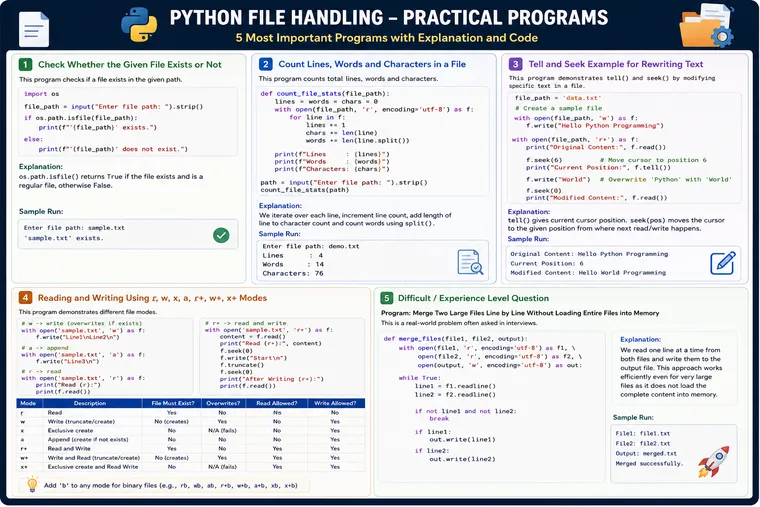
Python File Handling: 5 Practical Programs Every Python Developer Should Know
File handling is a fundamental Python skill, but in real projects it goes far beyond simply using open() and read(). A good Python developer should understand how files are opened, how data is read and written, how the file cursor works, how different modes affect existing data, and how to process large files without unnecessarily consuming memory.
This article brings five practical programs together in one place—from beginner-friendly filesystem checks to an experience-level problem involving large files. The examples are based on the concepts covered in the supplied study material, including file existence, line/word/character counting, tell()/seek(), file modes, and multi-file processing.
What You’ll Learn
By the end of this article, you should be able to:
- Check whether a file exists
- Read a file efficiently
- Count lines, words, and characters
- Understand the file cursor
- Use
tell()andseek() - Understand
r,w,x,a,r+,w+, andx+ - Understand when data is overwritten versus appended
- Process large files without loading everything into memory
- Answer practical file-handling interview questions
Program 1: Check Whether a File Exists
Problem
Write a Python program to check whether the given file exists or not.
This is a very common requirement in real applications.
For example, before reading:
configuration.jsonemployees.csvapplication.logwe may want to verify that the file actually exists.
The supplied material demonstrates this requirement using os.path.isfile().
Solution
import os
file_path = input("Enter file path: ").strip()
if os.path.isfile(file_path):    print(f"File exists: {file_path}")else:    print(f"File does not exist: {file_path}")
Example
Suppose the user enters:
employees.txtOutput:
File exists: employees.txtIf the file doesn’t exist:
File does not exist: employees.txtHow Does It Work?
Let’s break it down.
Step 1 — Import os
import osos provides operating-system-related functionality, including filesystem operations.
Step 2 — Get the file path
file_path = input("Enter file path: ").strip()The user provides the file name or complete path.
Step 3 — Check the path
os.path.isfile(file_path)This returns:
True → path exists and refers to a regular fileFalse → it isn't a regular file at that pathStep 4 — Take action
if os.path.isfile(file_path):If the result is True, we know we can proceed with file-related processing.
Better Production Approach
Checking existence separately and then opening the file can introduce a time-of-check/time-of-use race condition in concurrent environments.
For simple scripts, the existence check is perfectly reasonable.
For robust application code, you can often simply attempt the operation and handle the exception:
try:    with open("employees.txt", "r", encoding="utf-8") as file:        data = file.read()        print(data)
except FileNotFoundError:    print("File was not found.")
Interview Question
Should I always use os.path.isfile() before open()?
Not necessarily.
A strong answer is:
For a simple validation or user-facing check,
isfile()is useful. But when the actual operation is opening the file, attempting the operation and handlingFileNotFoundErroris often more robust because the filesystem can change between the check and the open.
Program 2: Count Lines, Words, and Characters
Problem
Write a Python program to count the number of lines, words, and characters present in a file.
This is a classic file-processing problem and is useful for understanding how to process a file incrementally. The supplied material uses line iteration, len(), and split() for this problem.
Solution
def count_file_statistics(file_path):    line_count = 0    word_count = 0    character_count = 0
    with open(file_path, "r", encoding="utf-8") as file:        for line in file:            line_count += 1            character_count += len(line)            word_count += len(line.split())
    print(f"Lines      : {line_count}")    print(f"Words      : {word_count}")    print(f"Characters : {character_count}")

file_path = input("Enter file path: ").strip()
try:    count_file_statistics(file_path)except FileNotFoundError:    print("File does not exist.")
Example Input File
Suppose data.txt contains:
Python is powerfulPython is easy to learnFile handling is importantThe program might produce:
Lines : 3Words : 12Characters : 77The exact character count depends on spaces and newline characters.
How Does This Program Work?
The important line is:
for line in file:This means Python reads the file progressively rather than explicitly loading the entire file into a list.
For every line:
line_count += 1increments the line count.
Then:
character_count += len(line)counts the characters in that line.
Finally:
word_count += len(line.split())splits the line into whitespace-separated pieces and counts them.
For example:
line = "Python is powerful"then:
line.split()produces approximately:
["Python", "is", "powerful"]Therefore:
len(line.split())is:
3Why Is This Approach Better for Large Files?
Consider a 5 GB log file.
This approach:
data = file.read()attempts to bring the entire content into memory.
Our approach:
for line in file:processes the file progressively.
Conceptually:
Large File │ ▼ Read Line │ ▼ Process Line │ ▼ Read Next Line │ ▼ Process LineSo the algorithm remains:
Time → O(n)Space → O(k)where:
n= total amount of data processedk= amount of data held during processing, roughly bounded by the current line/buffering
This is a very good interview point.
Program 3: tell() and seek() — Rewrite Text at a Specific Position
Now let’s move from basic file processing to understanding how Python tracks the current position inside a file.
The supplied material introduces tell() as a way to obtain the current cursor position and seek() as a way to move it.
Problem
Suppose a file contains:
Hello Python ProgrammingWe want to move the cursor to a specific position and replace part of the existing content.
Solution
file_path = "data.txt"
# Create initial contentwith open(file_path, "w", encoding="utf-8") as file:    file.write("Hello Python Programming")
# Read and modify the contentwith open(file_path, "r+", encoding="utf-8") as file:
    print("Original Content:")    print(file.read())
    print("Current Position:", file.tell())
    # Move cursor to position 6    file.seek(6)
    print("Position After seek():", file.tell())
    # Replace "Python" with "World"    file.write("World")
    # Move back to beginning    file.seek(0)
    print("Modified Content:")    print(file.read())
Output
Original Content:Hello Python Programming
Current Position: 24
Position After seek(): 6
Modified Content:Hello World Programming
Understanding the Cursor
Imagine the file as a sequence of positions:
Hello Python Programming012345678901234567890123 ↑ position 6When you call:
file.seek(6)the cursor moves to position 6.
Then:
file.write("World")writes from that position.
So:
Before:
Hello Python Programming      ↑    cursor

After writing:
Hello World Programming      ↑
What Does tell() Do?
file.tell()returns the current position.
For example:
with open("data.txt", "r") as file: print(file.tell())Initially:
0After:
file.read(5)the position advances accordingly.
The source material demonstrates this progression with tell() after successive reads.
What Does seek() Do?
file.seek(position)moves the cursor.
Example:
file.seek(0)moves it back to the beginning.
This is extremely useful when you need to:
- Re-read data
- Move to a known position
- Perform controlled read/write operations
- Work with random-access patterns
Important Interview Question
Can seek() replace arbitrary text of different lengths?
Not in the general “insert” sense.
For example:
Hello PythonIf you seek to the middle and write:
AmazingTechnologyyou are overwriting bytes/characters from that position, not automatically shifting all subsequent content to make room.
For inserting text while preserving everything afterward, you typically need to create a new representation or rewrite the affected portion.
This distinction is important in experienced-level interviews.
Program 4: Understanding r, w, x, a, r+, w+, and x+
Understanding file modes is one of the most frequently tested Python file-handling topics.
The supplied material covers r, w, a, r+, w+, a+, and x, along with binary variants.
Let’s understand them through one practical program.
File Mode Cheat Sheet
| Mode | Read | Write | Existing File | Missing File |
|---|---|---|---|---|
r | Yes | No | Required | Error |
w | No | Yes | Truncates | Creates |
x | No | Yes | Error | Creates |
a | No | Yes | Preserves | Creates |
r+ | Yes | Yes | Required | Error |
w+ | Yes | Yes | Truncates | Creates |
x+ | Yes | Yes | Error | Creates |
4.1 r — Read
with open("data.txt", "r", encoding="utf-8") as file: print(file.read())Use r when:
You only need to read existing data.
If the file doesn’t exist:
FileNotFoundError4.2 w — Write
with open("data.txt", "w", encoding="utf-8") as file: file.write("New Content")Important:
Existing content → DELETEDNew content → WRITTENIf the file doesn’t exist, Python creates it.
Interview trap
If you see:
open("important.txt", "w")ask yourself:
Do I really want to truncate the existing file?
4.3 x — Exclusive Creation
with open("new_data.txt", "x", encoding="utf-8") as file: file.write("Initial content")This is useful when you want to ensure that you’re creating a new file rather than accidentally overwriting an existing one.
If the file already exists:
FileExistsError4.4 a — Append
with open("application.log", "a", encoding="utf-8") as file: file.write("Application started\n")Existing content is preserved.
New data is appended.
Old entryOld entryApplication startedUse a for things such as:
- Logs
- Audit entries
- Event records
- Append-only data
4.5 r+ — Read and Write
with open("data.txt", "r+", encoding="utf-8") as file:    content = file.read()
    file.seek(0)    file.write("Updated")
Important characteristics:
Must already existCan readCan writeDoesn't automatically truncateThe cursor initially starts at the beginning.
4.6 w+ — Write and Read
with open("data.txt", "w+", encoding="utf-8") as file:    file.write("Hello Python")
    file.seek(0)
    print(file.read())
The critical point:
w+ → existing content is truncatedThen you can both write and read.
4.7 x+ — Create, Read and Write
with open("new_data.txt", "x+", encoding="utf-8") as file:    file.write("Hello Python")
    file.seek(0)
    print(file.read())
This combines:
x → exclusive creation+ → reading + writingIf the file already exists:
FileExistsErrorA Simple Way to Remember the Modes
Think about the first character:
r → existing resource, readw → write from scratcha → appendx → create exclusivelyThen:
+ → additionally allow reading and writingAnd:
b → binary modeSo:
rbwbabr+bw+ba+bxbx+brepresent binary variants.
Program 5: Experience-Level Problem — Merge Two Large Files Without Loading Them Into Memory
Now let’s move to a problem that tests more than syntax.
Problem
You have two large files:
file1.txtfile2.txtYou need to merge their contents into:
merged.txtThe files may be several gigabytes in size.
Constraint
Do not load the complete files into memory.
This is the kind of question that tests whether you understand streaming, memory complexity, file iteration, and resource management.
Solution
def merge_files(file1, file2, output):    with (        open(file1, "r", encoding="utf-8") as f1,        open(file2, "r", encoding="utf-8") as f2,        open(output, "w", encoding="utf-8") as out    ):
        while True:            line1 = f1.readline()            line2 = f2.readline()
            if not line1 and not line2:                break
            if line1:                out.write(line1)
            if line2:                out.write(line2)

merge_files(    "file1.txt",    "file2.txt",    "merged.txt")
print("Files merged successfully.")
How Does This Work?
The important design decision is:
f1.readline()f2.readline()instead of:
data1 = f1.read()data2 = f2.read()The program reads only the next line from each input file.
Conceptually:
file1 file2 │ │ ▼ ▼read line read line │ │ └────────┬────────────┘ ▼ output fileThen it repeats:
Read ↓Write ↓Discard ↓Read next ↓WriteThe complete contents never need to exist in memory simultaneously.
Why Is This an Experienced-Level Problem?
Because a beginner may write:
with open("file1.txt") as f1:    data1 = f1.read()
with open("file2.txt") as f2:    data2 = f2.read()
with open("merged.txt", "w") as out:    out.write(data1)    out.write(data2)
It works.
But imagine:
file1 = 8 GBfile2 = 7 GBYou could create enormous memory pressure.
The streaming solution keeps memory usage bounded.
Complexity Analysis
Let:
N = size of file1M = size of file2Every byte must be read and written.
Therefore:
Time Complexity = O(N + M)because the complete contents of both files must be processed.
The additional working memory is approximately:
Space Complexity = O(k)where k represents the amount of data held at a time, such as the current lines/buffer.
The important principle is:
You cannot reduce the time below O(N + M) if every byte must be examined/copied, but you can dramatically reduce the additional memory required by streaming.
Bonus Interview Challenge
An interviewer might change the problem:
“Now the files are 100 GB each. How would you merge them?”
The answer should immediately be:
Don't use read().Don't use readlines().Use streaming/chunk processing.Use with/context managers.Process bounded amounts of data.For binary data, chunk processing is often preferable:
def copy_file(source_path, destination_path):    with open(source_path, "rb") as source:        with open(destination_path, "wb") as destination:
            while chunk := source.read(1024 * 1024):                destination.write(chunk)
Here:
1024 * 1024 = 1 MBis the chosen chunk size.
Important Production Considerations
The code above demonstrates the core algorithm, but production systems may require additional considerations.
1. Encoding
For text:
encoding="utf-8"makes the expected encoding explicit.
2. Error handling
Real applications should consider:
FileNotFoundErrorPermissionErrorUnicodeDecodeErrorOSErrordepending on the operation.
3. Partial output
If a long-running operation fails halfway through, the output file may be incomplete.
For critical workflows, you may need:
temporary file ↓write successfully ↓flush/sync as appropriate ↓atomic rename4. Concurrency
If multiple processes write to the same file simultaneously, you need to think about synchronization and consistency.
5. File vs Database
If the requirement becomes:
Millions of records+Concurrent updates+Transactions+Complex queries+Indexesthen a database is generally a better architectural choice than a plain text file.
One Concept That Connects All Five Programs
All five programs are really teaching one bigger idea:
Treat external storage as a resource with cost and state.
Let’s connect them.
Program 1
os.path.isfile()asks:
Does this resource exist?
Program 2
for line in file:asks:
How can I process the resource efficiently?
Program 3
tell()seek()asks:
Where am I inside the resource?
Program 4
r / w / x / a / +asks:
What operations am I allowed to perform, and what happens to existing data?
Program 5
readline()asks:
How can I process huge resources without exhausting memory?
That’s the progression from basic Python knowledge to production-level thinking.
Interview Revision Table
| Question | Key Answer |
|---|---|
| How do you check whether a file exists? | os.path.isfile() / Path.is_file() |
What does r do? | Read existing file |
What does w do? | Write and truncate/create |
What does a do? | Append/create |
What does x do? | Exclusive creation |
What does + mean? | Enable both reading and writing |
What does b mean? | Binary mode |
What does tell() do? | Returns current file position |
What does seek() do? | Moves file position |
Why use with open()? | Automatic resource cleanup |
Why avoid read() for huge files? | It can require O(n) memory |
| How do you process huge files? | Stream line-by-line or in chunks |
| Complexity of processing entire file? | Usually O(n) time |
| Complexity of streaming? | O(n) time, O(k) additional space |
| Is file I/O CPU-bound? | Often I/O-bound |
| When should you prefer a DB? | Queries, transactions, indexing, concurrency, structured data |