 Sho
Sho2. Python Object Serialization with Pickle, JSON, and YAML — 7 Real-World Programs from Beginner to Advanced
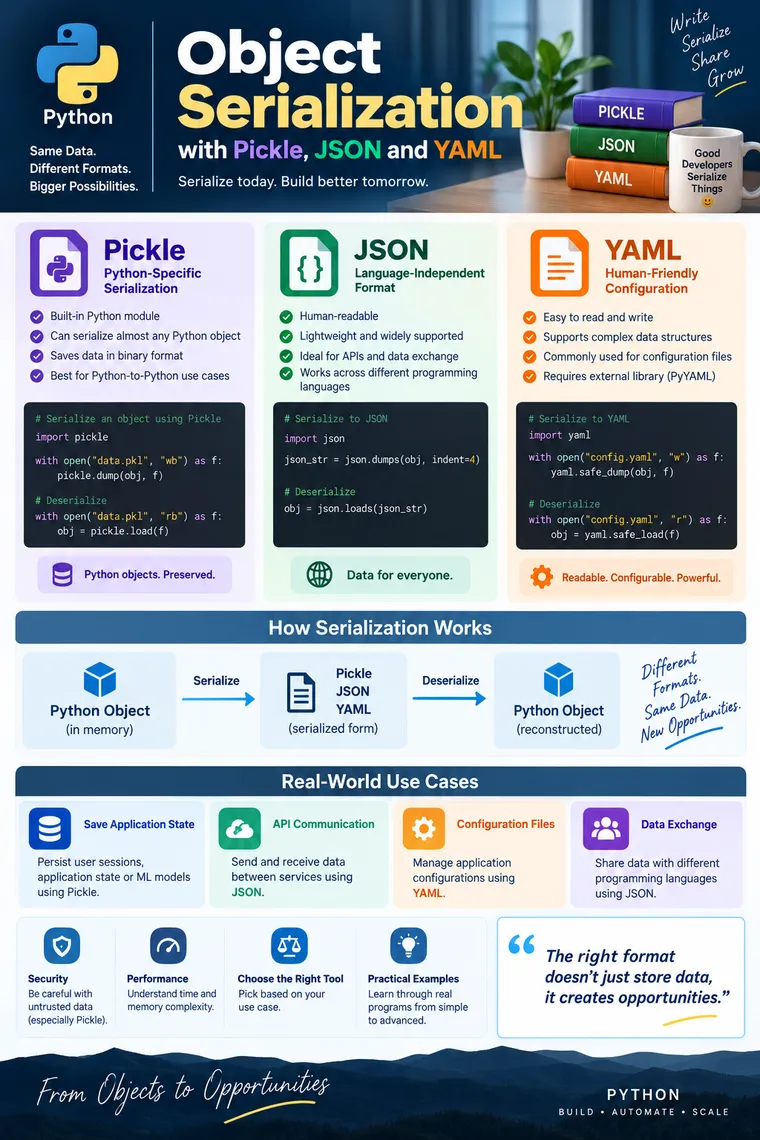
Python Object Serialization with Pickle, JSON, and YAML — 7 Real-World Programs from Beginner to Advanced
A practical guide to understanding serialization, deserialization, choosing the right format, and implementing real-world Python use cases
When a Python application is running, its data exists as Python objects in memory.
But real applications constantly need to:
- Save objects to files
- Store application state
- Send data between services
- Exchange data with Java, JavaScript, Go, etc.
- Store configuration
- Cache expensive computation results
- Persist ML models or application objects
- Transfer data through APIs
Python objects cannot simply be sent or stored in their in-memory representation.
This is where object serialization becomes important.
The reference material defines serialization as converting a Python object into a file-supported or network-supported representation, while deserialization converts that representation back into a Python-supported form.
1. What Is Object Serialization?
Suppose we have:
employee = { "id": 101, "name": "Harish", "salary": 120000}This object currently exists inside Python memory.
We may want to save it:
Python Object │ ▼Serialization │ ▼JSON / Pickle / YAML │ ▼File / Database / NetworkLater:
File / Network │ ▼JSON / Pickle / YAML │ ▼Deserialization │ ▼Python ObjectSerialization
Python Object → External Representation
Deserialization
External Representation → Python Object
2. Why Do We Need Serialization?
Consider an e-commerce application.
A customer places an order:
order = { "order_id": 1001, "customer": "Harish", "items": [ {"product": "Laptop", "quantity": 1}, {"product": "Mouse", "quantity": 2} ], "total": 85000}Now imagine that:
- Order Service creates the order
- Payment Service processes payment
- Inventory Service updates stock
- Notification Service sends an email
These services need to exchange data.
We cannot directly send a Python dictionary object to a Java or JavaScript service.
Instead:
Python Object ↓ JSON ↓Network ↓Java / JavaScript / Go / PythonJSON is particularly useful for interoperability because it is language-independent and human-readable.
3. Pickle vs JSON vs YAML
Before writing programs, understand the basic difference.
| Feature | Pickle | JSON | YAML |
|---|---|---|---|
| Python-specific | Yes | No | No |
| Human-readable | No | Yes | Yes |
| API communication | Usually no | Excellent | Sometimes |
| Configuration | Rarely | Sometimes | Excellent |
| Custom Python objects | Excellent | Requires conversion | Usually requires conversion |
| Cross-language | Poor | Excellent | Good |
| Python built-in | Yes | Yes | No, commonly PyYAML |
| Typical extension | .pkl | .json | .yaml / .yml |
| Untrusted input | Unsafe | Generally safer, but validate data | Use safe_load() |
| Best use | Python-specific persistence | APIs/data exchange | Configuration |
The reference material specifically covers pickle.dump()/pickle.load(), JSON’s dump/dumps and load/loads, and YAML serialization/deserialization.
Program 1 — Beginner: Serialize a Python Dictionary Using Pickle
Real-world use case
Imagine a Python application maintains some expensive-to-create application state.
Instead of recreating it every time, we can persist the state using Pickle.
import pickle
employee = {    "id": 101,    "name": "Harish",    "department": "Engineering",    "salary": 120000}
# Serializationwith open("employee.pkl", "wb") as file:    pickle.dump(employee, file)
print("Employee serialized successfully.")
What happened?
Python Dictionary ↓pickle.dump() ↓employee.pklNotice the file mode:
"wb"w→ writeb→ binary
Pickle works with a binary representation.
The reference material demonstrates the same pickle.dump(object, file) pattern and binary file handling.
Deserialize the Object
import pickle
with open("employee.pkl", "rb") as file:    employee = pickle.load(file)
print(employee)
Output:
{ 'id': 101, 'name': 'Harish', 'department': 'Engineering', 'salary': 120000}Here:
pickle.load()reconstructs the Python object.
Program 2 — Beginner → Intermediate: Serialize a Custom Python Object
This is where Pickle becomes particularly interesting.
Suppose we have an Employee class.
import pickle

class Employee:
    def __init__(self, employee_id, name, salary, department):        self.employee_id = employee_id        self.name = name        self.salary = salary        self.department = department
    def display(self):        print(f"ID         : {self.employee_id}")        print(f"Name       : {self.name}")        print(f"Salary     : {self.salary}")        print(f"Department : {self.department}")

employee = Employee(    101,    "Harish",    120000,    "Engineering")
with open("employee.pkl", "wb") as file:    pickle.dump(employee, file)
print("Employee object serialized.")
The reference material uses a similar custom Employee class and serializes the object with pickle.dump().
Deserialize
import pickle

with open("employee.pkl", "rb") as file:    employee = pickle.load(file)
employee.display()
Output:
ID : 101Name : HarishSalary : 120000Department : EngineeringWhy is this powerful?
Pickle can preserve a Python object’s structure much more naturally than JSON.
Conceptually:
Employee Object ↓ Pickle ↓employee.pkl ↓ Pickle ↓Employee ObjectThis is one of the major reasons Pickle is useful for Python-to-Python persistence.
⚠️ Important Pickle Security Rule
Never blindly unpickle data received from an untrusted source.
For example:
pickle.load(file)should not be treated as a safe operation on arbitrary uploaded or downloaded files.
Think about Pickle as:
Python object persistence, not a secure data-exchange format.
For APIs, external systems, and untrusted data, JSON is generally a much better choice.
Program 3 — Intermediate: Serialize Multiple Objects Using Pickle
This is closer to a real application.
Suppose an HR system wants to persist multiple employees.
import pickle

employees = [    {        "id": 101,        "name": "Harish",        "salary": 120000    },    {        "id": 102,        "name": "Ravi",        "salary": 110000    },    {        "id": 103,        "name": "Anita",        "salary": 130000    }]
with open("employees.pkl", "wb") as file:
    for employee in employees:        pickle.dump(employee, file)
print("All employees serialized.")
The reference material demonstrates serializing multiple objects sequentially and reading them until EOFError.
Reading Multiple Objects
import pickle

with open("employees.pkl", "rb") as file:
    while True:
        try:            employee = pickle.load(file)            print(employee)
        except EOFError:            break
Output:
{'id': 101, 'name': 'Harish', 'salary': 120000}{'id': 102, 'name': 'Ravi', 'salary': 110000}{'id': 103, 'name': 'Anita', 'salary': 130000}Why EOFError?
pickle.load() reads one serialized object at a time.
Eventually there are no more objects.
At that point:
EOFErrorindicates that the end of the serialized stream has been reached.
The same sequential-read approach is shown in the reference material.
Product-company perspective
This pattern can be useful when working with:
- Batch processing
- Internal Python pipelines
- Offline processing
- Legacy Python applications
- Internal data snapshots
For a new production system, however, you should also consider whether a structured format such as JSON, a database, or a dedicated storage format would be more maintainable.
Program 4 — Intermediate: Serialize an Object Using JSON
Now let’s move from Python-specific serialization to language-independent serialization.
Suppose our application needs to send employee information to a frontend application.
import json

employee = {    "id": 101,    "name": "Harish",    "salary": 120000,    "is_active": True}
json_string = json.dumps(    employee,    indent=4)
print(json_string)
Output:
{ "id": 101, "name": "Harish", "salary": 120000, "is_active": true}Notice:
Truebecame:
truePython’s common mappings include dictionary → JSON object, list/tuple → array, strings → string, numbers → number, and Boolean values → JSON Boolean values.
dumps() vs dump()
This is an important interview question.
dumps()
Converts Python data into a JSON string.
json_string = json.dumps(employee)dump()
Writes JSON directly to a file.
with open("employee.json", "w") as file: json.dump(employee, file, indent=4)The Python JSON module provides dumps() for JSON strings and dump() for file serialization.
Deserialize JSON
From a string:
employee = json.loads(json_string)
print(employee)
From a file:
with open("employee.json", "r") as file:    employee = json.load(file)
print(employee)
The difference:
dumps() → Python → JSON stringdump()  → Python → JSON file
loads() → JSON string → Pythonload()  → JSON file   → Python
Easy way to remember
S = String
dump   → filedumps  → string
load   → fileloads  → string
Program 5 — Intermediate → Advanced: Serialize a Custom Class Using JSON
Here is where many beginners get confused.
Consider:
class Employee:
    def __init__(self, employee_id, name, salary):        self.employee_id = employee_id        self.name = name        self.salary = salary
Create an object:
employee = Employee( 101, "Harish", 120000)Can we simply do this?
json.dump(employee, file)Generally, no.
JSON represents data structures, not arbitrary Python class instances.
A practical approach is to convert the object’s attributes into a dictionary.
import json

class Employee:
    def __init__(self, employee_id, name, salary):        self.employee_id = employee_id        self.name = name        self.salary = salary

employee = Employee(    101,    "Harish",    120000)
employee_dict = employee.__dict__
with open("employee.json", "w") as file:    json.dump(employee_dict, file, indent=4)
print("Employee serialized to JSON.")
The reference material demonstrates this approach using e.__dict__ before calling json.dump().
Deserialize JSON Back to Employee
import json

class Employee:
    def __init__(self, employee_id, name, salary):        self.employee_id = employee_id        self.name = name        self.salary = salary

with open("employee.json", "r") as file:    employee_data = json.load(file)
employee = Employee(    employee_data["employee_id"],    employee_data["name"],    employee_data["salary"])
print(employee.name)print(employee.salary)
Notice something important.
JSON gave us a dictionary:
employee_dataWe then explicitly created:
Employee(...)The reference material also emphasizes that JSON loading returns a Python data structure and that reconstruction of the custom class needs to be handled explicitly.
Program 6 — Advanced: YAML for Application Configuration
YAML becomes particularly useful when humans need to read and modify the serialized data.
A common real-world use case is application configuration.
For example:
application:  name: OrderService  version: 2.0
database:  host: localhost  port: 5432  name: orders
logging:  level: INFO
features:  enable_payment: true  enable_notifications: false
This is much easier for humans to maintain than a binary Pickle file.
Python commonly uses the PyYAML package for YAML processing.
Install it:
pip install pyyamlSerialize Dictionary to YAML
import yaml

config = {    "application": {        "name": "OrderService",        "version": 2.0    },    "database": {        "host": "localhost",        "port": 5432,        "name": "orders"    },    "logging": {        "level": "INFO"    }}
with open("config.yaml", "w") as file:    yaml.safe_dump(config, file, sort_keys=False)
print("Configuration saved.")
The reference material demonstrates YAML serialization using dump() and deserialization using safe_load().
Deserialize YAML
import yaml

with open("config.yaml", "r") as file:    config = yaml.safe_load(file)
print(config)
print("Database Host:",      config["database"]["host"])
print("Database Port:",      config["database"]["port"])
Output:
Database Host: localhostDatabase Port: 5432Why YAML?
Because developers and DevOps engineers frequently need to read and edit configuration manually.
Typical examples include:
- Application configuration
- CI/CD configuration
- Infrastructure definitions
- Deployment settings
- Environment-specific configuration
Program 7 — Advanced: Real-World Order Snapshot Using JSON
Let’s build something closer to a production application.
Suppose an e-commerce system needs to send an order from the backend to another service.
import json

order = {    "order_id": "ORD-1001",
    "customer": {        "id": 501,        "name": "Harish"    },
    "items": [        {            "product_id": "P101",            "name": "Laptop",            "quantity": 1,            "price": 75000        },        {            "product_id": "P202",            "name": "Mouse",            "quantity": 2,            "price": 1500        }    ],
    "payment": {        "method": "CARD",        "status": "SUCCESS"    },
    "shipping": {        "city": "Hyderabad",        "country": "India"    }}

json_payload = json.dumps(    order,    indent=4)
print(json_payload)
This JSON can become the payload of an HTTP API request.
Conceptually:
Order Service │ │ Python Object ▼ JSON Serialization │ ▼ HTTP Request │ ▼Payment / Inventory / Shipping Service │ ▼ JSON Deserialization │ ▼Native ObjectThis is one of the most important practical uses of serialization in modern backend systems.
4. One Real-World Scenario — Which Format Would You Choose?
Imagine you are building an e-commerce platform.
You have three requirements.
Requirement 1 — Save a Python ML model
Python Model ↓Pickle ↓model.pklPickle may be appropriate when the producer and consumer are trusted Python environments and the serialization format is controlled.
Requirement 2 — Send order information to a Java service
Python ↓ JSON ↓Network ↓JavaUse JSON.
Why?
Because the data needs to cross programming-language boundaries.
Requirement 3 — Store application configuration
Application ↓config.yamlUse YAML when human readability and convenient configuration editing are important.
5. Pickle vs JSON vs YAML — Practical Decision Tree
Use this mental model during interviews and real projects.
What are you serializing? │ ┌───────────┴───────────┐ │ │ Python-specific Shared data object/state between systems │ │ Pickle JSON │ │ Is it configuration? │ └──────────────→ YAMLMore practically:
Choose Pickle when:
- Both sides are Python
- You need Python-specific object persistence
- You need to preserve complex Python object structures
- The data is trusted
- You control both producer and consumer
Choose JSON when:
- Building REST APIs
- Communicating between microservices
- Sending data to frontend applications
- Communicating between different programming languages
- Human-readable data exchange is useful
Choose YAML when:
- Humans frequently edit the data
- You are managing application configuration
- You need hierarchical configuration
- Readability is more important than compactness
6. Security — A Critical Production Consideration
Serialization is not only a programming concept.
It is also a security boundary.
Pickle
Do not deserialize untrusted Pickle data.
Avoid:
pickle.load(untrusted_file)unless you fully trust the source.
YAML
Prefer:
yaml.safe_load(data)for untrusted or externally supplied YAML.
The reference material specifically points toward safe_load() rather than unrestricted loading.
JSON
JSON itself is a data format rather than an arbitrary Python-object execution mechanism, but external JSON should still be treated as untrusted input.
For example:
data = json.loads(request.body)doesn’t mean:
“The data is valid.”
You should still validate:
Required fieldsData typesRangesBusiness rulesAuthorizationPayload sizeSchemaFor production APIs, JSON Schema or application-level validation can be used depending on the architecture.
7. Time Complexity
A common interview question is:
What is the time complexity of serialization?
For a data structure containing N units of data, serialization/deserialization is typically approximately:
Time: O(N)because the serializer generally needs to inspect/process the data.
For example:
{ "employees": [...], "departments": [...], "projects": [...]}The actual performance depends on:
- Number of objects
- Object size
- Nesting depth
- Number of fields
- Serializer implementation
- Data types
- Encoding/decoding overhead
- I/O speed
Therefore, don’t say:
“Pickle is always faster than JSON.”
A better production-level statement is:
“Pickle can be efficient for Python-specific object serialization, but actual performance should be benchmarked against the workload and alternatives.”
8. Memory Complexity
Serialization frequently requires additional memory.
For an object containing N units of data, a useful high-level approximation is:
Additional memory: O(N)But the exact peak memory depends on the API being used.
For example:
json_string = json.dumps(large_object)creates a complete serialized string in memory.
Whereas:
json.dump(large_object, file)writes to a file-like object and can have different memory characteristics.
This distinction becomes important when processing large datasets.
9. dump() vs dumps() vs load() vs loads()
This is a very common interview question.
| Function | Direction | Destination/Source |
|---|---|---|
dump() | Python → serialized | File |
dumps() | Python → serialized | String |
load() | serialized → Python | File |
loads() | serialized → Python | String |
Remember:
S = StringTherefore:
dump()  → filedumps() → string
load()  → fileloads() → string
The reference material explicitly distinguishes these four JSON operations.
10. Pros and Cons
Pickle
Advantages
- Excellent Python integration
- Can serialize many Python object structures
- Simple API
- Useful for Python-specific persistence
- Can preserve object-oriented structures
Disadvantages
- Python-specific
- Poor choice for cross-language communication
- Not human-readable
- Unsafe with untrusted input
- Long-term compatibility should be considered carefully
JSON
Advantages
- Language-independent
- Human-readable
- Excellent for REST APIs
- Widely supported
- Easy to debug
- Good for microservice communication
Disadvantages
- Cannot directly represent arbitrary Python objects
- Requires conversion for custom classes
- Limited native data types compared with Python
- Large/nested payloads can become verbose
The reference material highlights JSON’s interoperability and human readability.
YAML
Advantages
- Highly readable
- Excellent for configuration
- Supports hierarchical structures
- Convenient for humans to edit
Disadvantages
- Requires an external Python package such as PyYAML
- More complex than JSON for some machine-to-machine use cases
- Safe loading practices are important
- YAML syntax can become complex if heavily nested
11. Interview Questions You Should Be Able to Answer
Beginner
1. What is serialization?
Converting an in-memory object into a representation that can be stored or transmitted.
2. What is deserialization?
Converting that representation back into an in-memory object/data structure.
3. What is Pickle?
A Python serialization mechanism for serializing Python objects.
4. What is JSON?
A language-independent, text-based data interchange format.
5. What is YAML?
A human-readable structured data format commonly used for configuration and data representation.
Intermediate
6. Difference between dump() and dumps()?
dump → filedumps → string7. Difference between load() and loads()?
load → fileloads → string8. Can JSON serialize a custom Python object directly?
Not generally. A common approach is to convert its attributes into a dictionary and serialize that structure. Object+Serialization+for+Online.pdfPDF
9. Why is Pickle not recommended for untrusted data?
Because deserialization can have security implications and should not be performed on untrusted serialized data.
10. Why is JSON preferred for microservices?
Because different services may be implemented using different programming languages.
Advanced
11. Why would you choose YAML over JSON?
When human readability and configuration management are major requirements.
12. Why would you choose JSON over Pickle?
When data needs to cross language or system boundaries.
13. Why would you choose Pickle over JSON?
When you control both sides and need Python-specific object persistence.
14. Is serialization always O(N)?
At a high level, serialization generally processes the data structure in proportion to its size, so O(N) is a useful approximation, but actual complexity depends on the data structure and implementation.
15. Is Pickle always faster than JSON?
No. Benchmark the actual workload.
12. Final Cheat Sheet
OBJECT │ ┌─────────┼─────────┐ │ │ │ Pickle JSON YAML │ │ │ Python-only APIs Configuration persistence Data Human-readable │ exchange │ │ │ │ .pkl file .json file .yaml fileRemember these three rules:
Pickle → Python objects
JSON → Communication
YAML → Configuration
And one important security rule:
Never blindly deserialize untrusted Pickle data, and use
safe_load()for untrusted YAML.
Conclusion
Object serialization is much more than simply writing an object to a file.
In real software systems, serialization is the bridge between:
Memory ↕Persistence ↕Network ↕Microservices ↕Databases / Storage ↕Other ApplicationsThe most important skill is not memorizing APIs.
It is knowing which serialization format fits the problem.
| Requirement | Recommended choice |
|---|---|
| Python-specific object persistence | Pickle |
| REST API | JSON |
| Microservice communication | JSON |
| Frontend/backend communication | JSON |
| Human-editable configuration | YAML |
| Trusted Python internal cache/state | Pickle can be considered |
| Untrusted external data | Prefer JSON + validation |
| Untrusted YAML | safe_load() |
If you’re preparing for a senior Python/backend interview, don’t stop at knowing dump() and load(). Be prepared to explain serialization format selection, security boundaries, interoperability, object reconstruction, memory usage, performance trade-offs, and why your production architecture chooses one format over another.