 Sho
Sho2. Spring Boot : From Manual Configuration to Auto-Configuration
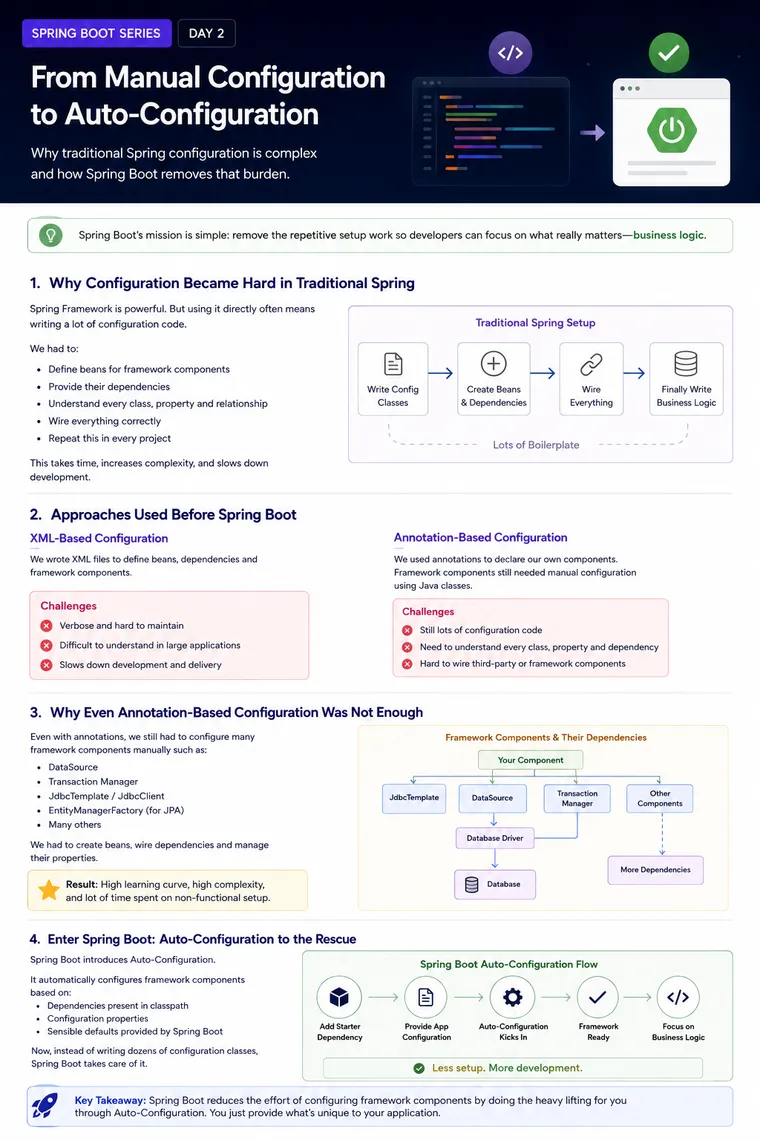
Spring Boot: From Manual Configuration to Auto-Configuration
Experience Level: Intermediate Java / Spring Developer
Series: Spring Boot Tutorial
Topic: Spring Configuration, Configuration Classes, Dependencies, and Auto-Configuration
Introduction
In previous topic, we looked at the relationship between the Spring Framework and Spring Boot and identified an important problem:
The Spring Framework provides powerful capabilities, but configuring all those capabilities can require significant infrastructure code.
Today, we will go one level deeper.
The question is:
Why was Spring Boot’s Auto-Configuration needed in the first place?
To answer that, let’s first understand how Spring applications were configured before Spring Boot could automatically assemble much of the required infrastructure.
1. The Real Challenge: Framework Configuration
Imagine that you want to use a database in your application.
Your application might directly use something like a JDBC client for database operations.
But that client doesn’t work in isolation.
It may depend on:
Application ↓JDBC Client ↓DataSource ↓Database Driver ↓DatabaseIf transactions are required, another component enters the picture:
Application ↓JDBC Client ↓DataSource ↓Transaction Manager ↓DatabaseThe developer therefore has two different responsibilities:
Business responsibility
Implement what the application actually needs to do.
Infrastructure responsibility
Configure the framework components required to make that business functionality work.
The second responsibility can become surprisingly large.
2. How Spring Configuration Evolved
There have been different approaches to configuring Spring applications.
Two important approaches are:
- XML-based configuration
- Java/annotation-based configuration
Both approaches improved certain aspects of development, but they did not completely remove the underlying configuration problem.
3. XML-Based Configuration
In early Spring applications, developers commonly described beans and their relationships using XML.
Conceptually:
<bean id="dataSource" class="some.DataSourceImplementation"> ...</bean>The XML tells Spring:
“Create this object and make it available inside the application context.”
This works, but large applications can accumulate a significant amount of XML configuration.
For example:
Application ↓XML Configuration ↓DataSource ↓Transaction Manager ↓Other Framework ComponentsThe problem isn’t that XML cannot configure an application.
The problem is scale and maintainability.
As the number of components grows, configuration files can become difficult to understand and maintain.
4. Java-Based and Annotation-Based Configuration
Java configuration made Spring configuration more natural for Java developers.
Instead of describing everything in XML, we can use Java classes and annotations.
For example:
@Configurationclass ApplicationConfig {
    @Bean    DataSource dataSource() {        // create and configure DataSource        return dataSource;    }}
And another component could depend on it:
@BeanJdbcClient jdbcClient(DataSource dataSource) { return JdbcClient.create(dataSource);}This is much easier to understand than large XML files.
But there is still a problem.
5. Annotation-Based Configuration Did Not Eliminate Everything
Annotations work extremely well for our own application classes.
For example:
@Serviceclass OrderService {}or:
@Repositoryclass OrderRepository {}Here, we own the source code.
We can add annotations directly to our classes.
But what happens when the object comes from a framework or third-party library?
Suppose we want a framework-provided object such as:
DataSourceJdbcClientTransaction ManagerWe cannot simply open the framework’s source code and add:
@Componentto its classes.
Those classes belong to libraries outside our application.
Therefore, we still need another mechanism to create and configure those objects.
That mechanism is typically Java configuration using @Configuration and @Bean.
6. The Hidden Complexity of Framework Components
Consider this simple requirement:
“I want to execute SQL using a JDBC client.”
It sounds simple.
But internally, the JDBC client needs a database connection source.
So we have:
JDBC Client ↓DataSource ↓Database Driver ↓DatabaseIf transactions are required:
JDBC Client ↓DataSource ↓Transaction Manager ↓DatabaseNow the developer has to understand:
- Which object should be created?
- What class should be used?
- What dependencies does it require?
- Which properties are mandatory?
- Which properties have defaults?
- How should the objects be connected?
- Which transaction manager should be used?
This is the real source of complexity.
7. Direct Dependencies vs Supporting Dependencies
This distinction is particularly useful when working with Spring.
Suppose your application directly uses:
JdbcClientYou might initially think:
“I only need JdbcClient.”
But JdbcClient requires supporting infrastructure.
Conceptually:
Your Application ↓ JdbcClient ↓ DataSource ↓ Database Driver ↓ DatabaseYour application may also require:
Transaction ManagerSo the component that you directly use can have several supporting components behind it.
This produces a dependency chain.
8. Why This Creates a Learning Curve
To configure everything manually, developers need to understand the framework deeply.
For example:
Which class? ↓Which constructor? ↓Which dependency? ↓Which property? ↓Which default? ↓Which bean? ↓How should it be connected?This isn’t necessarily bad.
In fact, understanding these things is extremely valuable for experienced Spring developers.
But there is a difference between:
Understanding how the framework works
and
Writing the same infrastructure configuration repeatedly in every project.
Spring Boot primarily tries to solve the second problem.
9. Configuration Classes Help — But They Are Still Code
Spring introduced configuration patterns that make framework configuration easier.
A configuration class can define framework objects as beans.
For example:
@Configurationclass DatabaseConfig {
    @Bean    DataSource dataSource() {        // configure DataSource        return dataSource;    }
    @Bean    JdbcClient jdbcClient(DataSource dataSource) {        return JdbcClient.create(dataSource);    }}
This is much cleaner than manually constructing these objects throughout the application.
Notice something important:
DataSource ↓JdbcClientThe dependency relationship is explicit.
Spring can use the DataSource bean when creating the JdbcClient bean.
10. But Imagine Doing This for Everything
Now imagine that your application needs:
WebDatabaseJPATransactionsSecurityCachingMessagingValidationMonitoringYou could potentially end up creating configuration for many infrastructure components.
The configuration itself can become a significant part of the project.
The developer isn’t necessarily writing difficult business logic.
They are mostly assembling infrastructure.
This is the problem Spring Boot tries to reduce.
11. Enter Auto-Configuration
Spring Boot introduced Auto-Configuration to reduce this repetitive configuration.
The basic idea is:
Application Dependencies +Application Configuration +Spring Boot Conditions ↓Auto-Configuration ↓Required InfrastructureInstead of requiring developers to manually configure every common framework component, Spring Boot can provide sensible configuration automatically.
12. What Does “Auto” Actually Mean?
Auto-configuration does not mean:
“Spring Boot magically understands the entire application.”
Instead, it means Spring Boot has predefined configuration logic that can be activated when certain conditions are satisfied.
For example, Boot may determine:
Is a particular library available? ↓Is the required class available? ↓Has the developer already defined a bean? ↓Are required properties available? ↓Should this configuration be applied?If the conditions match, Boot can configure the relevant infrastructure.
This is an important concept:
Auto-configuration is conditional configuration, not magic.
13. A Simplified Auto-Configuration Flow
Consider a database application.
The developer provides:
Database Dependency +Database ConfigurationSpring Boot can then apply suitable database-related auto-configuration.
Conceptually:
Database Dependency ↓Spring Boot detects database capability ↓Auto-Configuration ↓DataSource ↓Other supporting infrastructure ↓ApplicationThe developer doesn’t have to manually create every common infrastructure component.
14. Who Writes the Auto-Configuration?
This is another important concept.
The configuration doesn’t appear from nowhere.
Spring Boot provides auto-configuration classes as part of its ecosystem.
These classes contain the logic necessary to configure common infrastructure.
Conceptually:
Spring Boot │ ├── Database Auto-Configuration ├── Web Auto-Configuration ├── JPA Auto-Configuration ├── Messaging Auto-Configuration └── Other Auto-ConfigurationsThe framework authors have already encoded many common configuration decisions.
Therefore, instead of every application developer writing the same configuration repeatedly, Boot can reuse that configuration logic.
15. Why This Is Better
Compare the two approaches.
Manual approach
Developer ↓Understand framework component ↓Find implementation ↓Understand dependencies ↓Understand properties ↓Create bean ↓Wire dependencies ↓Repeat for other componentsAuto-Configuration approach
Developer ↓Declare required capability ↓Provide application-specific configuration ↓Spring Boot evaluates conditions ↓Auto-Configuration ↓Infrastructure becomes availableThe developer still controls the application.
Spring Boot simply handles much of the repetitive setup.
16. Example: DataSource and JdbcClient
Let’s use a simplified example.
Suppose we want to use:
JdbcClientA manual configuration approach could look conceptually like:
@Configurationclass DatabaseConfig {
    @Bean    DataSource dataSource() {        // configure database connection    }
    @Bean    JdbcClient jdbcClient(DataSource dataSource) {        return JdbcClient.create(dataSource);    }}
The important relationship is:
DataSource ↓JdbcClientThe JdbcClient needs a DataSource.
In a Spring Boot application, appropriate dependencies and database properties can allow Boot’s auto-configuration to establish common database infrastructure for you.
Your application can then inject the required component:
@Serviceclass CustomerService {
    private final JdbcClient jdbcClient;
    CustomerService(JdbcClient jdbcClient) {        this.jdbcClient = jdbcClient;    }}
The application focuses on using the database rather than repeatedly constructing the infrastructure.
17. Auto-Configuration Does Not Remove Configuration Completely
This is a very important clarification.
Spring Boot doesn’t mean:
No ConfigurationIt means:
Less Manual ConfigurationFor example, your application may still need to provide:
spring.datasource.url=...spring.datasource.username=...spring.datasource.password=...Those values are specific to your environment.
Spring Boot cannot know your production database password or database URL.
Therefore:
Spring Boot     ↓Provides common defaults
Developer     ↓Provides application-specific information
This is the balance.
18. Defaults vs Customization
Spring Boot follows a useful principle:
Use sensible defaults when possible, but allow developers to override them when necessary.
For example:
Default Configuration ↓Works for common applicationsBut if your application has special requirements:
Custom Configuration ↓Override the defaultThis is why understanding the underlying Spring Framework remains important.
As an experienced developer, you shouldn’t only know:
“Boot automatically configured it.”
You should also be able to investigate:
“What did Boot configure, why did it configure it, and how can I customize it?”
19. The Important Relationship
At this point, the relationship between Spring Framework and Spring Boot becomes clearer.
Spring Framework │ ├── Provides infrastructure capabilities │ ├── Provides application programming models │ └── Provides framework components │ ▼ Spring Boot │ ┌────────────┴────────────┐ │ │Dependency Management Auto-Configuration │ │ └────────────┬────────────┘ ▼ Easier Application SetupSpring Boot builds on the Spring ecosystem.
It doesn’t replace the underlying framework.
20. Why This Matters for Experienced Developers
If you’re an experienced Java developer, don’t stop at:
“Spring Boot automatically creates the bean.”
Go one level deeper.
Ask:
- Which auto-configuration class created it?
- What condition triggered it?
- What properties influenced it?
- Which dependency made that configuration available?
- What happens if I define my own bean?
- How can I override the default?
- What infrastructure exists behind the component I am using?
These questions take you from Spring Boot user to Spring Boot engineer.
21. A Better Way to Understand Auto-Configuration
Think of Spring Boot as having a library of predefined infrastructure recipes.
For example:
Recipe: Database ↓Create DataSource ↓Configure it ↓Make it available as a beanAnother recipe:
Recipe: Web Application ↓Configure web infrastructure ↓Configure embedded server ↓Start applicationAnother:
Recipe: JPA ↓Configure persistence infrastructure ↓Connect it to database infrastructureBoot decides whether these recipes should be applied based on conditions.
That’s a much better mental model than thinking:
“Spring Boot magically does everything.”
22. The Developer’s Responsibility Has Changed
Without Boot, the developer may spend significant effort on:
Framework Setup+Dependency Wiring+Infrastructure ConfigurationWith Boot, the developer’s responsibility shifts more toward:
Application Design+Business Logic+Application-Specific Configuration+Customization When RequiredThis is the real productivity gain.
23. What Spring Boot Is Actually Automating
Spring Boot can help automate common infrastructure around areas such as:
DatabaseWebJPATransactionsValidationSecurityMessagingMonitoringTestingThe exact behavior depends on the dependencies and configuration in your application.
Therefore, the correct statement is:
Spring Boot automatically configures many common infrastructure components when their required conditions are satisfied.
Not:
Spring Boot automatically configures everything.
24. Mental Model
If you remember only one diagram from today’s lesson, remember this:
YOUR APPLICATION │ ▼ Required Dependencies │ ▼ Spring Boot │ ┌─────────┴─────────┐ │ │ ▼ ▼ Conditions Configuration │ │ └─────────┬─────────┘ ▼ Auto-Configuration │ ▼ Spring Framework Beans │ ┌───────────┼───────────┐ ▼ ▼ ▼ DataSource JdbcClient Transactions │ ▼ Database │ ▼ Business LogicThe developer provides what is specific to the application.
Spring Boot provides many of the common infrastructure pieces.
25. Key Takeaways
1. Spring Framework is powerful but configurable
Its flexibility means developers may need to understand and configure many components.
2. XML reduced neither the underlying complexity nor the number of components
It mainly changed how configuration was expressed.
3. Java configuration made configuration more developer-friendly
But framework and third-party components still required explicit configuration.
4. Framework components have dependencies
A component you directly use may depend on several infrastructure components.
5. Spring Boot addresses this repetitive work
Auto-configuration can create and configure common infrastructure based on conditions.
6. Auto-configuration is not magic
It is predefined, conditional configuration supplied by the Spring Boot ecosystem.
7. Boot does not eliminate customization
Developers can provide their own configuration and override defaults when necessary.
Final Thought
The real evolution is not:
XML → Annotations → MagicIt is:
Manual Configuration ↓Java / Annotation-Based Configuration ↓Reusable Framework Configuration ↓Spring Boot Auto-Configuration ↓Less Repetitive Infrastructure WorkThe key idea is simple:
If thousands of applications repeatedly need to configure the same infrastructure, why should every developer write that configuration from scratch?
Spring Boot answers that question by providing reusable, conditional auto-configuration.
And this leads to an important engineering principle:
Developers should configure what is unique to their application; the framework should provide sensible defaults for what is common.
That is the foundation for understanding Spring Boot Auto-Configuration.