 Sho
Sho1. Python Types & Async/Await
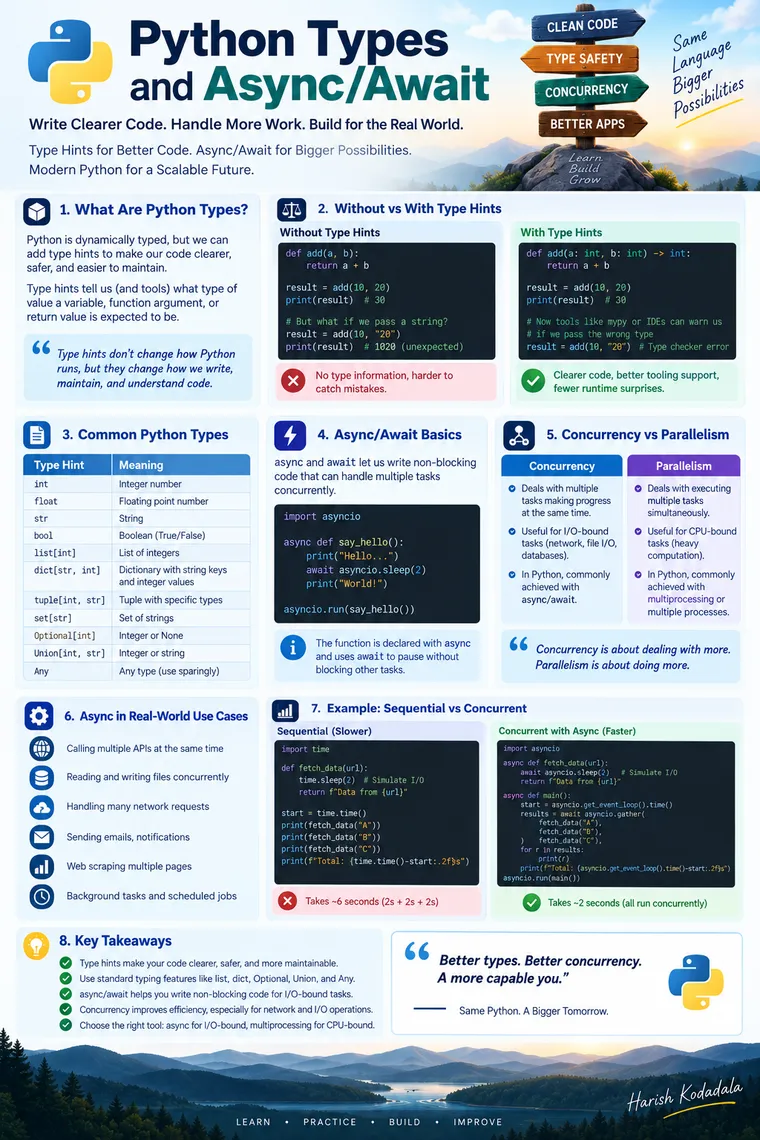
Python Types & Async/Await: A Practical Guide for Developers Who Want Cleaner, Faster Code
A hands-on tutorial covering two features that quietly separate “Python scripts” from “production Python” — type hints and asynchronous programming.
If you’ve written Python for a while, you’ve probably lived through both worlds: the quick untyped script that grew into an unmaintainable mess, and the slow, blocking service that fell over the moment real traffic hit it. Both problems have the same root cause — the language gave you the freedom to skip structure and skip waiting-efficiently, and nobody stopped you from taking that freedom too far.
This tutorial walks through two features that fix exactly those two problems:
- Type hints — so your code documents itself and your editor catches mistakes before your users do.
async/await— so your program stops wasting time sitting idle while it waits for the network, disk, or database.
We’ll go step by step, with real “before vs after” code, so even if you’ve only read about these features in passing, you’ll come out able to use them confidently in your own projects.
Part 1: Python Type Hints
The problem: Python without types
Let’s start with a completely ordinary function.
def calculate_total(price, quantity, discount): return (price * quantity) - discountNothing wrong with it syntactically. It runs. But now imagine you’re the third engineer to touch this function, six months after it was written, with no docstring in sight. A few honest questions come up:
- Is
priceafloator aDecimal? Because those behave very differently with rounding. - Is
discounta flat amount, or a percentage between 0 and 1? - What happens if someone passes a
stringforquantityby mistake?
Nothing tells you. Your editor can’t help you either — autocomplete has nothing to work with, so it just shows you every method on every object in the universe:
calculate_total("49.99", 3, None)# Runs without error... then crashes three functions downstream# TypeError: unsupported operand type(s) for -: 'str' and 'NoneType'This is the quiet tax of dynamic typing: the bug doesn’t show up where the mistake was made. It shows up somewhere else entirely, usually in production, usually at the worst time.
Adding type hints
Now let’s add type hints. The syntax is small — a colon after the parameter name, and the type:
def calculate_total(price: float, quantity: int, discount: float) -> float: return (price * quantity) - discountThat’s the entire change. Nothing about how the function runs is different — Python still doesn’t enforce these types at runtime by itself. What changes is everything around the function:
- Your editor now autocompletes correctly and flags
calculate_total("49.99", 3, None)as wrong before you even run it. - A static type checker like
mypyorpyrightcan scan your whole codebase and catch this class of bug in CI, before it ships. - Anyone reading the function signature instantly knows the expected shape of the data — no docstring required.
This is the core idea to hold onto: type hints are for tools and humans, not for the interpreter. They turn implicit assumptions into explicit, checkable contracts.
The building blocks
Simple types cover most cases directly:
def greet(name: str, age: int, is_member: bool) -> str: return f"{name} ({age}) - member: {is_member}"Generic types — list, dict, tuple, set — let you describe what’s inside a container, not just the container itself:
def average_price(prices: list[float]) -> float:    return sum(prices) / len(prices)
def build_catalog(items: dict[str, float]) -> None:    for name, price in items.items():        print(f"{name}: ${price:.2f}")
def get_coordinates() -> tuple[float, float]:    return (17.385, 78.4867)
Without list[float], your editor treats every element you pull out of prices as a mystery object. With it, the moment you write prices[0]. inside the function, you get real float methods in autocomplete — not a guess.
Union types describe “this could be more than one type” — written with |:
def parse_id(raw_id: int | str) -> int: return int(raw_id)Optional values are just a union with None, and this one catches a huge number of real bugs:
def find_user(user_id: int) -> str | None:    users = {1: "Harsha", 2: "Naga"}    return users.get(user_id)
# Without the hint, this looks safe. With it, your type checker# immediately flags the missing None-check:user = find_user(5)print(user.upper())   # ⚠️ error: "upper" is not a known attribute of "None"
That single | None forces you to write the defensive check you should have written anyway:
user = find_user(5)if user is not None: print(user.upper())Custom classes work as types too — this is where type hints start paying off the most in real applications:
class Customer:    def __init__(self, name: str, email: str):        self.name = name        self.email = email
def send_invoice(customer: Customer, amount: float) -> None:    print(f"Sending invoice of ${amount:.2f} to {customer.email}")
Now customer. in your editor shows .name and .email — real fields on a real class, not guesswork.
Before vs after: a realistic example
Here’s a function pulled from a typical order-processing module, first without types:
def apply_discount(order, code): if code in discounts: return order["total"] * (1 - discounts[code]) return order["total"]Reasonable questions an editor (and a new teammate) can’t answer here: What’s inside order? Is code case-sensitive? What does this return — a float, a rounded value, a currency string?
With types:
from typing import TypedDict
class Order(TypedDict):    id: int    total: float    customer_email: str
discounts: dict[str, float] = {"SAVE10": 0.10, "SAVE20": 0.20}
def apply_discount(order: Order, code: str | None) -> float:    if code is not None and code in discounts:        return order["total"] * (1 - discounts[code])    return order["total"]
Now the shape of order is documented in exactly one place — the Order definition — instead of scattered across every function that touches it. If someone renames total to grand_total in the TypedDict, every place still using the old key gets flagged by the type checker instead of failing quietly at 2 a.m.
A note on runtime validation
Type hints by themselves are not enforced at runtime — Python will happily let you pass the wrong type in, and only your editor or type checker will complain. If you need actual runtime validation (rejecting bad data as it comes in from a form, a file, or an API), that’s a different job, usually handled by a validation library built on top of type hints — the type hints tell the library exactly what shape of data to expect and convert, so you’re not writing that logic by hand.
from dataclasses import dataclass
@dataclassclass Product:    name: str    price: float    in_stock: bool = True
p = Product(name="Chair", price=49.99)print(p)# Product(name='Chair', price=49.99, in_stock=True)
dataclass uses your type hints to auto-generate __init__, __repr__, and equality checks — a small taste of how much leverage a single type annotation gives you once other tools start reading it.
One more thing: Annotated
Python also lets you attach metadata to a type hint without changing what the type actually is, using Annotated from the typing module:
from typing import Annotated
def set_timeout(seconds: Annotated[int, "must be between 1 and 300"]) -> None:    ...
To Python and your editor, seconds is still just an int. The string is invisible at runtime — it exists purely for other tools (validators, documentation generators, ORMs) that know to look for it. You’ll see this pattern a lot once you start working with data-validation and schema libraries.
Part 2: Concurrency and async / await
The problem: waiting is expensive when you do it wrong
Picture a support desk with a single agent. A customer calls in, the agent takes the call, and while they’re on hold waiting for the customer’s account to load, the agent just… stares at the screen. Doesn’t take the next call. Doesn’t do anything else. Just waits.
That’s what a normal (synchronous) function does when it calls a slow operation — reading a file, querying a database, calling an external API:
import time
def fetch_order_status(order_id: int) -> str:    time.sleep(1.2)   # simulates a network call    return f"Order {order_id}: shipped"
def fetch_inventory(sku: str) -> str:    time.sleep(0.9)    return f"{sku}: 42 in stock"
def fetch_pricing(sku: str) -> str:    time.sleep(1.4)    return f"{sku}: $49.99"
start = time.perf_counter()print(fetch_order_status(101))print(fetch_inventory("SKU-1"))print(fetch_pricing("SKU-1"))print(f"Total time: {time.perf_counter() - start:.1f}s")# Total time: 3.5s
Each call blocks the entire program until it finishes. Nothing else happens during that 1.2 seconds, 0.9 seconds, or 1.4 seconds — even though your CPU is doing essentially nothing during that time. It’s just waiting for a response to come back over the network.
This is the distinction worth burning into memory: an operation is “I/O-bound” when most of its time is spent waiting on something external — network, disk, database — rather than doing actual computation. And waiting is exactly the kind of work a computer can multitask on, if you let it.
Concurrency vs. parallelism — they are not the same thing
These two words get used interchangeably all the time, and mixing them up leads to picking the wrong tool for the job.
Think of a single barista running a coffee shop during the morning rush. They take an order, start the espresso machine, and while it’s brewing, they don’t just stand there — they take the next customer’s order, steam some milk for a different drink, ring up a third customer. One person, several drinks “in flight” at once, because most of the work is waiting on the machine. That’s concurrency: making progress on multiple things by cleverly interleaving the waiting periods, without needing more than one worker.
Now imagine four baristas, each running their own espresso machine, each handling one customer start to finish. Four drinks are being made at the exact same literal instant. That’s parallelism — genuinely simultaneous execution, which requires multiple workers (multiple CPU cores, in computing terms).
Concurrency wins when your bottleneck is waiting (I/O-bound work — API calls, database queries, file access). Parallelism wins when your bottleneck is computation (CPU-bound work — image processing, numeric simulations, machine learning inference). Using the wrong one doesn’t just fail to help — running four single-threaded “concurrent” workers to crunch matrix multiplications won’t speed anything up, because there’s no waiting to interleave; the CPU is busy the entire time.
async and await
Python’s async/await syntax gives you concurrency without the pain of manually juggling callbacks. Here’s the same three calls, rewritten as coroutines:
import asyncio
async def fetch_order_status(order_id: int) -> str:    await asyncio.sleep(1.2)   # simulates an async network call    return f"Order {order_id}: shipped"
async def fetch_inventory(sku: str) -> str:    await asyncio.sleep(0.9)    return f"{sku}: 42 in stock"
async def fetch_pricing(sku: str) -> str:    await asyncio.sleep(1.4)    return f"{sku}: $49.99"
async def main() -> None:    results = await asyncio.gather(        fetch_order_status(101),        fetch_inventory("SKU-1"),        fetch_pricing("SKU-1"),    )    for r in results:        print(r)
asyncio.run(main())# Total time: ~1.4s — the length of the *slowest* call, not the sum of all three
A few rules that make this click:
async defmarks a function as a coroutine — a function that can pause partway through and let something else run.awaitis the pause button. It says “start this, and while it’s waiting, let the event loop go do other work — come back to me when there’s a result.”- You can only use
awaitinside a function defined withasync def. This is the “chicken and egg” rule beginners trip over: async functions call other async functions, and somewhere at the top, one regular function (asyncio.run(main())) kicks the whole chain off. - Calling an
async deffunction withoutawait-ing it doesn’t run it — it just gives you back an unstarted coroutine object sitting in memory, which is one of the most common async bugs:
result = fetch_pricing("SKU-1")print(result)# <coroutine object fetch_pricing at 0x7f...> ← forgot to await it!Why asyncio.gather is the whole point
Notice what changed between the two versions. In the blocking version, three calls added up to 3.5 seconds because each one waited for the previous one to fully finish. In the async version, all three coroutines start almost immediately, and while each is “waiting” on its simulated network delay, Python’s event loop is free to make progress on the others. The total time collapses to roughly the length of the longest single wait — 1.4 seconds — not the sum of all three.
That’s the entire value proposition of async I/O in one sentence: you stop paying for your waits one at a time, and start paying for them all at once.
The trap: mixing blocking code into async functions
This is the single most common mistake developers make when they first pick up async/await:
import time
async def bad_fetch(order_id: int) -> str:    time.sleep(1.2)   # ❌ this BLOCKS the entire event loop    return f"Order {order_id}: shipped"
time.sleep() is a synchronous, blocking call. Putting it inside an async def function doesn’t make it non-blocking — it just freezes the entire event loop for 1.2 seconds, defeating the whole purpose. Every other coroutine that was supposed to run concurrently gets stuck waiting too. The fix is to use the async-native version of the operation — asyncio.sleep(), or an async HTTP client, or an async database driver — anything explicitly built to await instead of block.
This matters just as much for real I/O: if the library you’re using to talk to a database or call an API doesn’t support await, wrapping your function in async def buys you nothing. The rule of thumb: only reach for async def when the operations inside it actually support await. If they don’t, a normal def function is not just fine — it’s the more honest choice, because it doesn’t pretend to be non-blocking when it isn’t.
Coroutines, in plain terms
A coroutine is just the object you get back when you call an async def function. It’s a paused, resumable unit of work — Python knows it can start it, pause it at every await, and resume it later without losing its place. That’s the entire mechanism underneath the “concurrency” we’ve been describing: many coroutines, each one pausing at its own await points, letting the event loop hop between them while each one is idle.
When to reach for threads or multiprocessing instead
async/await solves I/O-bound waiting. It does not speed up CPU-bound work — if you’re resizing thousands of images or running a heavy numeric computation, no amount of await will make your CPU finish the multiplication faster, because there’s no waiting to interleave in the first place; the processor is busy the entire time.
- I/O-bound (network calls, file reads, database queries) →
async/await(concurrency) - CPU-bound (image processing, numeric simulations, encryption) →
multiprocessing(real parallelism, using multiple CPU cores) - Working with an existing library that’s blocking but you can’t rewrite it → a thread pool (
concurrent.futures.ThreadPoolExecutor) is often the pragmatic bridge
Picking the right one for the job matters more than picking the trendiest one.
Bringing both together
Type hints and async code aren’t separate topics — they compose naturally, and the combination is what most modern Python services actually look like day to day:
import asyncio
async def fetch_prices(skus: list[str]) -> dict[str, float]:    async def fetch_one(sku: str) -> tuple[str, float]:        await asyncio.sleep(0.5)        return sku, 49.99
    results: list[tuple[str, float]] = await asyncio.gather(        *(fetch_one(sku) for sku in skus)    )    return dict(results)
Every parameter, every return value, every intermediate variable here is typed — and the function is fully asynchronous. Your editor understands the shape of the data at every step, and your program isn’t wasting time sitting idle on network calls. That combination — clear types plus non-blocking I/O — is a big part of why modern Python web services and data pipelines feel so much more solid than the scripts most of us started out writing.
Quick reference
Type hints
| Without types | With types |
|---|---|
| Editor guesses at autocomplete | Editor knows exact fields/methods |
| Bugs surface downstream, at runtime | Bugs caught in your editor or CI |
| Function shape lives only in your head | Function shape is documented in the signature |
Concurrency vs. parallelism
| Best for | Tool | |
|---|---|---|
| Concurrency | I/O-bound (network, disk, DB) | async/await |
| Parallelism | CPU-bound (compute-heavy work) | multiprocessing |
Wrapping up
Neither of these features is complicated once you’ve seen them in action — the syntax for both is genuinely small. What takes practice is the judgment: knowing when a type hint would have saved you a debugging session, and knowing whether the slow part of your code is waiting or computing. Once that judgment clicks, you stop writing Python that merely works, and start writing Python that’s honest about what it expects and efficient about what it waits for.
Try it on your next function: add the type hints first, then ask whether it’s doing any waiting on the network, disk, or a database — and if it is, that’s your candidate for async def.