 Sho
Sho1. Python Decorators
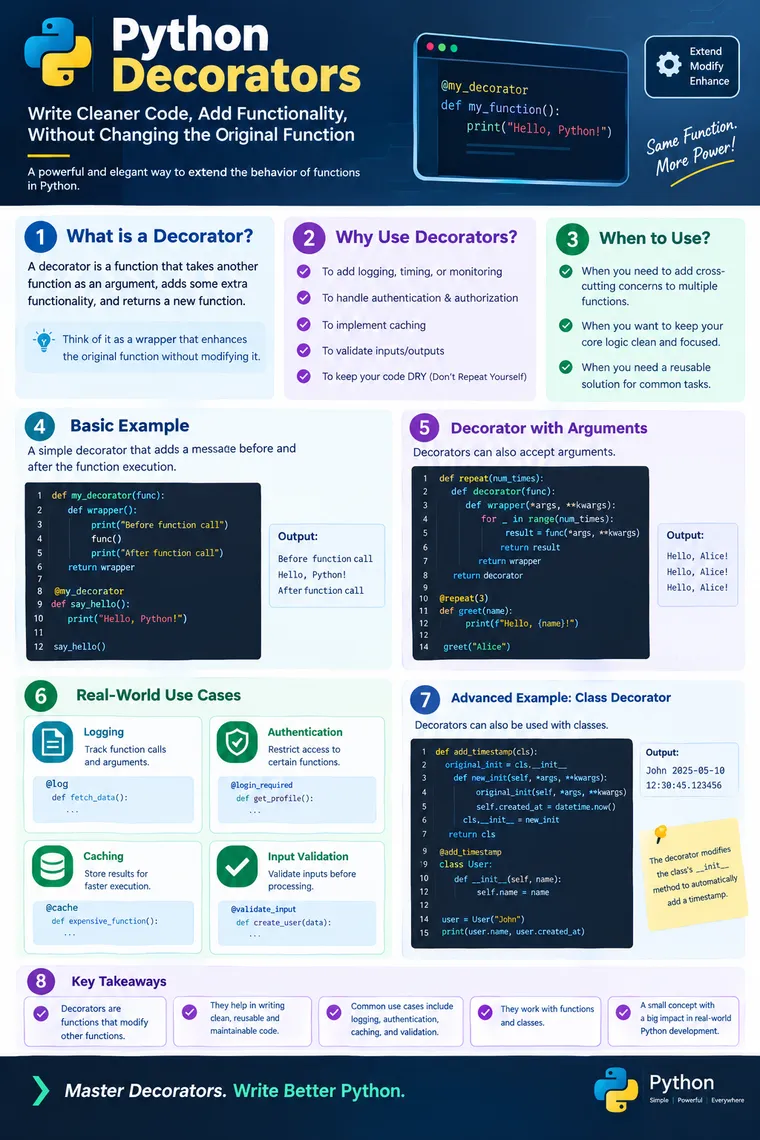
Python Decorators: The Professional Guide to Writing Cleaner, Reusable, and Scalable Python Code
A decorator is not just a Python syntax feature. It is a design technique for adding behavior to existing functions or methods without modifying their core implementation.
In real-world enterprise Python development, the same requirements appear repeatedly:
- Log every API call.
- Measure execution time.
- Check authentication and authorization.
- Validate inputs.
- Cache expensive operations.
- Retry failed operations.
- Track metrics.
- Control access to sensitive functions.
- Add auditing without touching business logic.
One approach is to write these pieces of code inside every function.
That works—but it quickly creates duplication, tightly coupled code, and difficult maintenance.
Decorators provide a cleaner solution.
Important Note About the Attached Material
The uploaded file is actually titled “Generator Functions Study Material” and its content focuses on generator functions, yield, next(), Fibonacci generation, memory utilization, and generators vs. collections. 23.Generator+Functions+Study+Material (1).pdfPDF
So, the attached material does not contain Python Decorators. I have therefore kept the decorator article below based on Python expertise and practical enterprise development rather than pretending the attached material covers decorators.
1. What Exactly Is a Python Decorator?
A decorator is a function that:
- Receives another function.
- Adds or changes behavior around that function.
- Returns a new function.
The simplest mental model is:
Original Function │ ▼ Decorator │ ▼Wrapped Function │ ▼Additional BehaviorFor example, suppose we have:
def greet(): print("Hello!")Now imagine we want logging:
Before function execution ↓ greet() ↓After function executionInstead of modifying greet(), we can use a decorator.
2. Why Do We Need Decorators?
Consider an enterprise application with 100 functions.
Suppose we need logging for all of them.
Without decorators, developers might write:
def create_user():    print("Function started")
    # business logic
    print("Function completed")

def delete_user():    print("Function started")
    # business logic
    print("Function completed")

def update_user():    print("Function started")
    # business logic
    print("Function completed")
The business logic is different, but the logging logic is duplicated.
This violates an important software engineering principle:
Don’t Repeat Yourself (DRY).
With a decorator:
def logger(func):
    def wrapper():        print("Function started")
        func()
        print("Function completed")
    return wrapper
Now:
@loggerdef create_user():    print("Creating user")

@loggerdef delete_user():    print("Deleting user")
The business functions remain focused on their actual responsibility.
3. Understanding @decorator Syntax
When you write:
@loggerdef create_user(): print("Creating user")Python conceptually transforms it into:
def create_user():    print("Creating user")
create_user = logger(create_user)
This is one of the most important things to understand about decorators.
The @ syntax is essentially syntactic sugar for function reassignment.
4. Your First Decorator
Let’s build one step by step.
def logger(func):
    def wrapper():        print("Before function execution")
        func()
        print("After function execution")
    return wrapper
Now apply it:
@loggerdef greet():    print("Hello Python!")

greet()
Output:
Before function executionHello Python!After function executionWhat happened internally?
Initially:
greet → original functionAfter:
@loggerdef greet(): ...Python effectively performs:
greet │ ▼logger(greet) │ ▼wrapperSo greet now points to the wrapper function.
5. The Real Power: *args and **kwargs
Our previous decorator works only for functions without arguments.
What happens here?
@loggerdef add(a, b): return a + bOur previous wrapper() cannot accept a and b.
A production-quality generic decorator should normally support arbitrary positional and keyword arguments:
def logger(func):
    def wrapper(*args, **kwargs):
        print(f"Calling {func.__name__}")
        result = func(*args, **kwargs)
        print(f"Finished {func.__name__}")
        return result
    return wrapper
Now:
@loggerdef add(a, b):    return a + b

result = add(10, 20)
print(result)
Output:
Calling addFinished add30This pattern is extremely important in real projects.
6. Why Do We Return the Result?
Consider:
def add(a, b): return a + bThe caller expects:
result = add(10, 20)and:
result = 30If the decorator doesn’t return the function’s result:
def logger(func):
    def wrapper(*args, **kwargs):
        func(*args, **kwargs)
    return wrapper
then:
result = add(10, 20)
print(result)
produces:
NoneTherefore, a general-purpose decorator should normally preserve the return value:
result = func(*args, **kwargs)
return result
7. Real-Time Use Case #1 — Execution Time Measurement
One of the most common uses of decorators is measuring performance.
import time

def measure_time(func):
    def wrapper(*args, **kwargs):
        start = time.perf_counter()
        result = func(*args, **kwargs)
        end = time.perf_counter()
        print(            f"{func.__name__} took "            f"{end - start:.4f} seconds"        )
        return result
    return wrapper
Use it:
@measure_timedef calculate_sum():
    return sum(range(1_000_000))

calculate_sum()
Possible output:
calculate_sum took 0.0214 secondsEnterprise use
This technique can be useful when investigating:
- Slow database operations
- Expensive calculations
- API latency
- Batch processing
- Data-processing pipelines
Instead of adding timing code to every function, you can decorate the functions you want to observe.
8. Real-Time Use Case #2 — Logging
Logging is another classic decorator use case.
def log_execution(func):
    def wrapper(*args, **kwargs):
        print(f"Starting {func.__name__}")
        result = func(*args, **kwargs)
        print(f"Completed {func.__name__}")
        return result
    return wrapper
Usage:
@log_executiondef process_payment(amount):
    print(f"Processing payment: {amount}")
    return "SUCCESS"

process_payment(5000)
Output:
Starting process_paymentProcessing payment: 5000Completed process_paymentIn a production application, print() would normally be replaced with a proper logging framework.
9. Real-Time Use Case #3 — Authentication
Imagine:
def view_dashboard(user):
    return "Dashboard data"
Only authenticated users should access it.
A decorator can centralize that concern:
def login_required(func):
    def wrapper(user, *args, **kwargs):
        if not user.is_authenticated:            return "Login required"
        return func(user, *args, **kwargs)
    return wrapper
Then:
@login_requireddef view_dashboard(user):
    return "Dashboard data"
Now authentication becomes reusable.
This is particularly valuable in web applications where many endpoints require similar security checks.
10. Real-Time Use Case #4 — Authorization
Authentication asks:
Who are you?
Authorization asks:
Are you allowed to perform this operation?
For example:
def admin_only(func):
    def wrapper(user, *args, **kwargs):
        if user.role != "admin":            return "Access denied"
        return func(user, *args, **kwargs)
    return wrapper
Usage:
@admin_onlydef delete_customer(user, customer_id):
    return f"Customer {customer_id} deleted"
This keeps the authorization concern outside the business logic.
11. Real-Time Use Case #5 — Retry Failed Operations
Distributed systems frequently encounter temporary failures.
For example:
- Network timeout
- Temporary database issue
- External API failure
- Service unavailable
- Connection reset
A retry decorator can centralize retry behavior.
import time

def retry(attempts):
    def decorator(func):
        def wrapper(*args, **kwargs):
            for attempt in range(attempts):
                try:                    return func(*args, **kwargs)
                except Exception as exc:
                    if attempt == attempts - 1:                        raise
                    print(                        f"Attempt {attempt + 1} failed. "                        "Retrying..."                    )
                    time.sleep(1)
        return wrapper
    return decorator
Usage:
@retry(3)def call_external_service():
    # API call
    return "Success"
This introduces an important decorator concept:
A decorator can itself accept configuration.
12. Decorators With Arguments
This is slightly more advanced.
We have:
@retry(3)instead of:
@retryThere are actually three layers involved:
retry(3) │ ▼decorator │ ▼wrapper │ ▼original functionConceptually:
def retry(attempts):
    def decorator(func):
        def wrapper(*args, **kwargs):            ...
        return wrapper
    return decorator
This pattern is extremely useful for configurable behavior.
Examples:
@retry(3)@log_execution@measure_timedef process_order(): ...13. Multiple Decorators
Python allows multiple decorators.
@log_execution@measure_timedef process_order(): print("Processing order")The order matters.
Python conceptually applies decorators from the bottom upward:
process_order = log_execution( measure_time(process_order))This means decorator ordering can affect behavior.
For experienced developers, this is a very important debugging point.
14. functools.wraps — A Professional Best Practice
Consider:
def logger(func):
    def wrapper(*args, **kwargs):        return func(*args, **kwargs)
    return wrapper
There is a subtle problem.
The wrapper can replace metadata such as:
__name____doc__Use:
from functools import wrapsand:
def logger(func):
    @wraps(func)    def wrapper(*args, **kwargs):
        return func(*args, **kwargs)
    return wrapper
Now Python preserves important metadata from the original function.
Professional rule
When writing reusable decorators:
from functools import wrapsshould usually be part of your standard decorator pattern.
15. Decorators and Closures
Decorators are closely connected to another Python concept:
closures.
Example:
def logger(func):
    def wrapper():
        print("Before")
        func()
        print("After")
    return wrapper
Notice that wrapper() can access:
funceven though func belongs to the outer function.
That is because wrapper forms a closure over func.
So to deeply understand decorators, you should understand:
Functions as Objects ↓Nested Functions ↓Closures ↓DecoratorsThis is one reason decorators become much easier once Python’s functional programming concepts are clear.
16. Decorators for Caching
Suppose we have an expensive calculation:
def calculate(n):
    # expensive calculation
    return result
Calling the same calculation repeatedly may waste resources.
Python provides:
from functools import lru_cacheExample:
from functools import lru_cache

@lru_cache(maxsize=128)def fibonacci(n):
    if n <= 1:        return n
    return fibonacci(n - 1) + fibonacci(n - 2)
The decorator adds caching behavior without requiring the core Fibonacci implementation to manage a cache manually.
This is a powerful example of separation of concerns.
17. Built-in Decorators Every Python Developer Should Know
Decorators are not limited to custom functions.
Python itself provides several important decorators.
@staticmethod
class MathUtils:
    @staticmethod    def add(a, b):        return a + b
@classmethod
class Employee:
    company = "ABC"
    @classmethod    def get_company(cls):        return cls.company
@property
class Employee:
    def __init__(self, salary):        self._salary = salary
    @property    def salary(self):        return self._salary
@functools.lru_cache
@lru_cachedef expensive_operation(): ...Understanding these becomes much easier once you understand the decorator mechanism.
18. Where Decorators Appear in Real Applications
Decorators are especially common in frameworks and libraries.
You may encounter patterns such as:
@app.route("/users")def users(): ...or:
@login_requireddef dashboard(): ...or:
@transactiondef transfer_money(): ...or:
@cachedef get_product(): ...The exact implementation differs between frameworks, but the underlying idea is similar:
Attach reusable behavior to a function without putting that behavior directly inside the function’s business logic.
19. Decorators and Separation of Concerns
This is perhaps the most important architectural benefit.
Imagine:
Function │ ┌───────────────┼───────────────┐ ▼ ▼ ▼ Logging Security Metrics │ │ │ └───────────────┼───────────────┘ ▼ Business LogicWithout decorators, all these concerns may become mixed together.
With decorators:
Logging ↓Authentication ↓Authorization ↓Metrics ↓Business FunctionThe business function remains focused.
20. Decorator vs Normal Function
A normal function:
def add(a, b): return a + bA decorator:
def logger(func):
    @wraps(func)    def wrapper(*args, **kwargs):        print("Executing")        return func(*args, **kwargs)
    return wrapper
The important difference is:
| Normal Function | Decorator |
|---|---|
| Performs a specific operation | Extends another callable |
| Usually works on data | Usually works around behavior |
| Called directly | Applied to another function/class |
| Focuses on business operation | Focuses on reusable cross-cutting behavior |
21. When Should You Use Decorators?
Use decorators when you repeatedly need to add the same kind of behavior to multiple functions or methods.
Good candidates include:
- Logging
- Authentication
- Authorization
- Caching
- Metrics
- Performance measurement
- Validation
- Retry logic
- Auditing
- Transactions
- Feature flags
- Rate limiting
A useful question is:
“Do I need the same behavior around several functions?”
If yes, a decorator may be a good design choice.
22. When Should You NOT Use Decorators?
Decorators are powerful, but they can be overused.
Avoid creating decorators when:
1. The behavior is needed only once
A simple function may be clearer.
2. The decorator hides too much logic
If someone cannot understand what a function does because it has five layers of decorators, maintainability suffers.
3. The decorator changes behavior unexpectedly
A decorator should have a clear and predictable contract.
4. Debugging becomes unnecessarily difficult
Remember:
Function ↓Decorator A ↓Decorator B ↓Decorator CA failure may occur in any layer.
23. Performance and Memory Considerations
Decorators don’t magically make code faster.
A wrapper introduces an additional function call:
Caller ↓Wrapper ↓Original FunctionTherefore, there is some additional call overhead.
For most business applications, this overhead is negligible compared with:
- Database calls
- Network calls
- File I/O
- API calls
- Complex computation
But in extremely hot code paths—such as millions of tiny function calls—decorator overhead can become measurable.
Complexity
A decorator itself generally does not change the algorithmic complexity of the wrapped function.
If:
process(data)takes:
O(n)then adding a simple logging decorator generally leaves the dominant complexity at approximately:
O(n)although the decorator adds constant overhead:
O(1)per invocation.
The actual performance depends on what the decorator does.
For example:
Logging → small overheadTiming → small overheadCaching → may significantly improve repeated callsRetry → may increase total work during failuresAuthorization → additional validation overhead24. A Production-Style Decorator
Let’s combine several good practices.
from functools import wrapsimport time

def monitor(func):
    @wraps(func)    def wrapper(*args, **kwargs):
        start = time.perf_counter()
        try:            result = func(*args, **kwargs)
            return result
        finally:            elapsed = time.perf_counter() - start
            print(                f"{func.__name__} "                f"completed in {elapsed:.4f}s"            )
    return wrapper
Usage:
@monitordef process_order(order_id):
    print(f"Processing order {order_id}")
    return "SUCCESS"

result = process_order(1001)
This demonstrates several professional concepts:
@wraps*args**kwargs- Return-value preservation
try/finally- Performance measurement
- Separation of concerns
25. A More Realistic Enterprise Example
Imagine an order-processing service:
@authentication_required@authorization_required@validate_order@measure_time@audit_logdef process_order(order): ...The actual business function can remain focused:
def process_order(order):
    # Core business logic only
    payment = process_payment(order)
    inventory = update_inventory(order)
    return create_order_response(        payment,        inventory    )
The surrounding concerns are handled separately.
This is where decorators move beyond being a Python interview topic and become an architectural tool.
26. The Decorator Mental Model
Remember this simple model:
ORIGINAL FUNCTION │ ▼ ┌───────────┐ │ DECORATOR │ └─────┬─────┘ │ ▼ ┌───────────┐ │ WRAPPER │ └─────┬─────┘ │ ┌─────────┴─────────┐ ▼ ▼ Extra Behavior Original Logic │ │ └─────────┬─────────┘ ▼ RESULTOnce this mental model becomes clear, most decorator syntax becomes much easier to understand.
27. Common Mistakes Developers Make
Mistake 1 — Forgetting to return the wrapper
Wrong:
def decorator(func):
    def wrapper():        func()
    # missing return wrapper
Correct:
return wrapperMistake 2 — Forgetting the original return value
Wrong:
def wrapper(*args, **kwargs): func(*args, **kwargs)Correct:
return func(*args, **kwargs)Mistake 3 — Not supporting arguments
Instead of:
def wrapper():prefer:
def wrapper(*args, **kwargs):for general-purpose decorators.
Mistake 4 — Forgetting @wraps
Prefer:
@wraps(func)for reusable decorators.
Mistake 5 — Creating too many decorator layers
Readable:
@auth_required@measure_timedef process(): ...Potentially difficult to maintain:
@a@b@c@d@e@f@gdef process(): ...Use abstraction carefully.
28. Decorators: Beginner → Experienced Developer Perspective
Beginner
“A decorator uses
@before a function.”
Correct, but incomplete.
Intermediate
“A decorator wraps another function and adds behavior.”
Better.
Experienced
“Decorators provide reusable behavioral composition and help isolate cross-cutting concerns from core business logic.”
That is the mindset you want to develop as an enterprise Python developer.
29. Interview Questions You Should Be Able to Answer
Q1. What is a decorator?
A function or callable mechanism that extends or modifies the behavior of another callable without directly changing its implementation.
Q2. What does @decorator mean?
It is syntactic sugar for applying a decorator to a function/class.
Q3. Why use *args and **kwargs?
To allow the wrapper to accept arbitrary positional and keyword arguments.
Q4. Why use functools.wraps?
To preserve important metadata of the wrapped function.
Q5. Can decorators accept arguments?
Yes.
Example:
@retry(3)Q6. Can classes be decorated?
Yes. Decorators can be applied to classes as well as functions and methods.
Q7. Can multiple decorators be applied?
Yes.
@decorator_a@decorator_bdef function(): ...Q8. What are common real-world decorator use cases?
Logging, authentication, authorization, caching, validation, monitoring, retries, metrics, auditing, and transactions.
30. Final Takeaway
Python decorators may look like a small language feature:
@somethingdef function(): ...But behind that simple syntax is a powerful software engineering idea:
Separate what a function does from what should happen around it.
Your business function should primarily focus on business logic.
Decorators can handle the surrounding concerns:
Enterprise Function │ ┌───────────────┼────────────────┐ ▼ ▼ ▼ Security Logging Metrics │ │ │ └───────────────┼────────────────┘ ▼ Business LogicThis leads to code that is:
- Reusable
- Maintainable
- Testable
- Modular
- Less repetitive
- Easier to extend
- Better aligned with separation of concerns
And that is why decorators are much more than an interview question.
They are one of the techniques that help turn Python code from “working code” into maintainable production software.
Quick Cheat Sheet
| Requirement | Decorator Pattern |
|---|---|
| Logging | @logger |
| Execution timing | @measure_time |
| Authentication | @login_required |
| Authorization | @admin_only |
| Caching | @lru_cache |
| Retry | @retry(3) |
| Validation | @validate |
| Auditing | @audit |
| Metrics | @monitor |
| Transactions | @transactional |
Remember:
Decorator = Wrap + Extend + Reuse
Function +Reusable Behavior =DecoratorMaster decorators, and you start thinking not only about how Python executes code, but also about how to design cleaner software systems.