 Sho
Sho7. Spring Boot Starters and Maven Dependency Management: How Everything Works Together
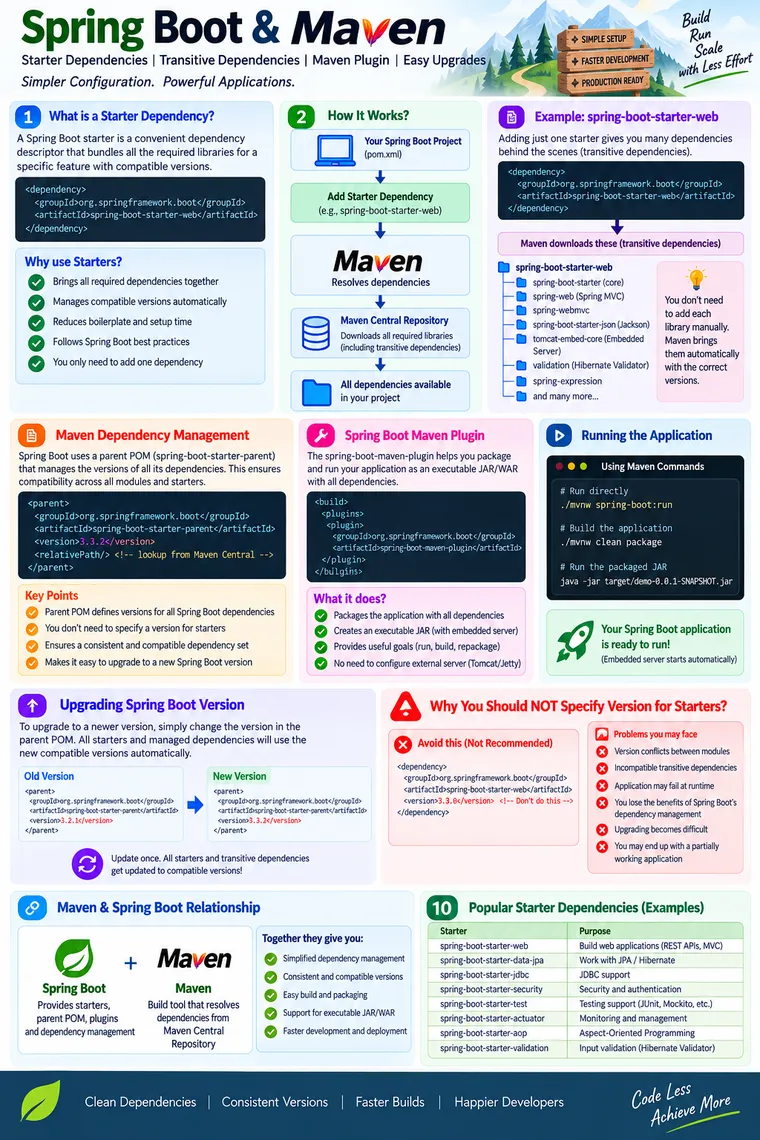
Spring Boot Starters and Maven Dependency Management: How Everything Works Together
When building a Spring Boot application, one of the first things we usually do is add dependencies to pom.xml.
For example:
<dependency> <groupId>org.springframework.boot</groupId> <artifactId>spring-boot-starter-web</artifactId></dependency>It looks simple.
But an experienced developer should understand what actually happens after this dependency is added.
Where does Maven find it?
Why does adding one dependency bring many other JARs?
Who decides the versions?
Why don’t we normally specify a version for every Spring Boot starter?
What happens when we upgrade Spring Boot?
And what exactly does spring-boot-maven-plugin do?
These questions lead to an important relationship:
Spring Boot ↓Dependency Management ↓Starters ↓Transitive Dependencies ↓Maven Resolution ↓Application Classpath ↓Maven Build ↓Executable Spring Boot JARUnderstanding this flow helps you troubleshoot dependency conflicts, perform Spring Boot upgrades safely, and maintain enterprise applications more effectively.
1. First Understand Maven’s Job
Spring Boot does not download JAR files by itself.
Maven is the build and dependency-management tool.
Maven handles tasks such as:
- Resolving dependencies
- Downloading artifacts
- Managing dependency versions
- Resolving transitive dependencies
- Compiling the application
- Running tests
- Packaging the application
- Executing build plugins
A simplified flow looks like this:
pom.xml │ ▼Maven │ ├── Read dependencies ├── Resolve versions ├── Resolve transitive dependencies └── Download required artifacts │ ▼ Remote Repository │ ├── Maven Central └── Internal repositories │ ▼ Local Maven Repository │ ▼ Application ClasspathMaven Central is the default public repository for many projects, but enterprise organizations can also use repositories such as Nexus or Artifactory.
So it is better to think of Maven as:
The engine that resolves and manages the dependency graph.
2. What Is a Maven Dependency?
A Maven dependency is identified primarily by its coordinates.
The three most important coordinates are:
groupIdartifactIdversionFor example:
<dependency> <groupId>org.springframework.boot</groupId> <artifactId>spring-boot-starter-web</artifactId> <version>...</version></dependency>groupId
Identifies the organization or project.
org.springframework.bootartifactId
Identifies the particular artifact.
spring-boot-starter-webversion
Identifies the version of that artifact.
4.x.xTogether, these coordinates tell Maven exactly which artifact is being requested.
3. What Is a Spring Boot Starter?
A Spring Boot Starter is essentially a convenient dependency descriptor.
Instead of manually selecting several libraries required for a particular type of application, Spring Boot provides a starter that groups the commonly required dependencies.
For example:
<dependency> <groupId>org.springframework.boot</groupId> <artifactId>spring-boot-starter-web</artifactId></dependency>Conceptually:
spring-boot-starter-web │ ├── Spring Web ├── Spring MVC ├── JSON support ├── Validation-related support ├── Embedded web server support └── Other required librariesThe exact dependency graph can change between Spring Boot versions, so the important concept is not memorizing the list.
The important concept is:
A starter gives Maven a convenient entry point into a curated dependency set.
4. Why Were Starters Introduced?
Imagine building a web application without starters.
You might need to manually identify:
Spring WebSpring MVCJSON libraryServlet APIEmbedded serverLoggingValidationSpring CoreSpring Context...Then you need to consider:
- Which versions work together?
- Which dependencies are mandatory?
- Which dependencies are transitive?
- Are there duplicate libraries?
- Is one library incompatible with another?
- Which version should be upgraded?
This becomes increasingly difficult as the application grows.
Spring Boot simplifies the developer experience.
Instead of thinking:
“Which 15 libraries do I need?”
you can think:
“I am building a web application.”
Then:
spring-boot-starter-webbecomes the dependency entry point.
5. Direct vs Transitive Dependencies
This is one of the most important Maven concepts.
Suppose your application explicitly declares:
<dependency> <groupId>org.springframework.boot</groupId> <artifactId>spring-boot-starter-web</artifactId></dependency>This is your direct dependency.
But the starter itself depends on other libraries.
Those libraries become transitive dependencies.
Conceptually:
Your Application │ ▼spring-boot-starter-web │ ├── Spring Web ├── Spring MVC ├── JSON support ├── Embedded server └── Other supporting librariesYou didn’t explicitly write all of those dependencies in your pom.xml.
Maven discovers them from the dependency metadata and resolves them.
6. What Does “Transitive” Really Mean?
Consider:
Application ↓Library A ↓Library B ↓Library CYour application directly depends on Library A.
Library A depends on Library B.
Library B depends on Library C.
Therefore:
A → B → CB and C are transitive dependencies of your application.
This is why adding one dependency can result in several JARs appearing in your dependency tree.
7. How Maven Resolves the Dependency
When Maven builds your project, it reads your pom.xml.
For example:
<dependency> <groupId>org.springframework.boot</groupId> <artifactId>spring-boot-starter-web</artifactId></dependency>Maven then roughly performs this process:
pom.xml ↓Identify dependency coordinates ↓Determine managed version ↓Read dependency metadata ↓Resolve transitive dependencies ↓Resolve conflicts ↓Download missing artifacts ↓Store them in local Maven repository ↓Make them available to the build/classpathThe local Maven repository is commonly located under:
~/.m2/repositorySo after dependencies have been downloaded, Maven does not need to download the same artifact again every time.
8. Maven Does Not Always Mean Maven Central
A common beginner explanation is:
“Maven always downloads dependencies from Maven Central.”
That’s not completely accurate.
Maven can resolve dependencies from configured repositories.
For example:
Maven │ ├── Local Repository │ ├── Maven Central │ └── Enterprise Repository ├── Nexus └── ArtifactoryIn an enterprise environment, organizations commonly use an internal artifact repository.
This provides benefits such as:
- Dependency caching
- Security scanning
- Controlled access
- Approved artifact management
- Reproducible builds
- Reduced external dependency on public repositories
9. Where Spring Boot Dependency Management Enters the Picture
Now we reach one of the most important Spring Boot concepts.
Suppose your application uses:
Spring BootSpring FrameworkJacksonHibernateTomcatJUnit...Each library has its own version.
Managing all these versions manually would be difficult.
Spring Boot provides dependency management for a curated set of dependencies.
Conceptually:
Spring Boot Version │ ▼Boot Dependency Management │ ├── Spring Framework version ├── Jackson version ├── Hibernate version ├── Tomcat version ├── Testing libraries └── Other compatible dependenciesThis creates a consistent dependency platform.
10. spring-boot-starter-parent
A common Maven configuration is:
<parent> <groupId>org.springframework.boot</groupId> <artifactId>spring-boot-starter-parent</artifactId> <version>YOUR_BOOT_VERSION</version></parent>Then dependencies can usually be declared without individual versions:
<dependency> <groupId>org.springframework.boot</groupId> <artifactId>spring-boot-starter-web</artifactId></dependency>The parent provides useful Maven defaults and participates in Spring Boot’s dependency management.
11. What About spring-boot-dependencies?
Spring Boot also provides its dependency-management BOM:
spring-boot-dependenciesA project does not necessarily have to use spring-boot-starter-parent.
For example, organizations with their own corporate parent POM can import the Spring Boot BOM instead.
Conceptually:
Corporate Parent POM │ └── Spring Boot Dependency Management │ ├── Spring ├── Hibernate ├── Jackson ├── Tomcat └── Other managed dependenciesThis is especially useful in large organizations where a company-wide Maven parent already exists.
12. Why Don’t We Normally Specify Versions for Spring Boot Starters?
Consider the recommended style:
<dependency> <groupId>org.springframework.boot</groupId> <artifactId>spring-boot-starter-web</artifactId></dependency>Notice:
No version.
Why?
Because the Spring Boot dependency-management platform can provide the appropriate version.
This gives us:
Boot Version ↓Managed Starter Version ↓Managed Spring Versions ↓Managed Third-Party VersionsThe result is better platform alignment.
13. What Happens If You Specify a Starter Version Manually?
You technically can specify a version.
For example:
<dependency> <groupId>org.springframework.boot</groupId> <artifactId>spring-boot-starter-web</artifactId> <version>...</version></dependency>But if that version differs from the Spring Boot platform you’re using, you can override the version that Boot’s dependency management would otherwise provide.
For example:
Spring Boot Platform        │        ├── Expected starter version        ├── Expected Spring version        ├── Expected Jackson version        └── Expected server version
                X
Manually overridden starter        │        └── Different version
Now the dependency platform may no longer be aligned.
14. What Problems Can Version Misalignment Cause?
Potential problems include:
1. Dependency conflicts
Two parts of the application may expect different versions of the same library.
2. Runtime errors
The application may compile successfully but fail at runtime because a method or class expected by one library is missing from another version.
Typical examples include errors such as:
NoSuchMethodErrorClassNotFoundExceptionNoClassDefFoundErrorLinkageError3. Unexpected behavior
The application may start successfully but behave differently because incompatible versions are interacting.
4. Difficult upgrades
Instead of upgrading one platform version, you now have several manually maintained versions.
5. Loss of dependency-management benefits
You are effectively taking responsibility for part of the compatibility matrix that Spring Boot normally manages for you.
Therefore:
Do not manually version every Spring Boot starter unless you have a deliberate reason to override Boot’s dependency management.
15. Is Explicit Versioning Always Wrong?
No.
This distinction is important for experienced developers.
Explicit versioning is not inherently invalid.
There are situations where you may deliberately override a managed dependency.
For example:
Spring Boot managed version ↓ Override ↓Specific organization requirementBut this should be an intentional engineering decision.
Before overriding a version, understand:
- Why is the override required?
- Is the version compatible with this Spring Boot release?
- Does it introduce another transitive dependency?
- Has the application been tested?
- Does the security fix justify the override?
- Will the override be removed during the next Boot upgrade?
Dependency management is a platform contract, not just a convenience.
16. Spring Boot Upgrade: The Right Mental Model
Suppose your project currently uses:
Spring Boot 4.x.xand you want to move to a newer supported release.
The normal approach is not:
Change starter-web versionChange starter-jdbc versionChange starter-security versionChange starter-data-jpa versionChange starter-test version...Instead, when using Boot dependency management, you normally upgrade the Boot platform version.
For example:
<parent> <groupId>org.springframework.boot</groupId> <artifactId>spring-boot-starter-parent</artifactId> <version>NEW_BOOT_VERSION</version></parent>Then the managed dependency set moves with the platform.
Conceptually:
OLD BOOT VERSION       │       ▼Old managed dependency set

NEW BOOT VERSION       │       ▼New managed dependency set       │       ├── Spring       ├── Hibernate       ├── Jackson       ├── Server       └── Other managed libraries
This is one of the biggest benefits of Spring Boot’s dependency-management model.
17. But a Boot Upgrade Is More Than Changing One Number
Changing the version is the starting point, not the entire upgrade process.
A production upgrade should include:
Change Boot version ↓Read release notes ↓Review migration guide ↓Build ↓Run unit tests ↓Run integration tests ↓Check dependency tree ↓Run application ↓Validate APIs/configuration ↓Security/performance testing ↓Deploy ↓MonitorMajor or feature releases can contain:
- Removed APIs
- Changed configuration properties
- Changed defaults
- Dependency upgrades
- Framework behavior changes
- Deprecated API removals
Therefore, never treat a Spring Boot upgrade as simply:
“Change version and deploy.”
18. A Useful Maven Command: Dependency Tree
When debugging dependency problems, one of the most useful commands is:
mvn dependency:treeIt helps you see:
your-application ├── spring-boot-starter-web │ ├── spring-web │ ├── spring-webmvc │ └── ... │ ├── spring-boot-starter-data-jpa │ ├── spring-data-jpa │ ├── hibernate │ └── ... │ └── spring-boot-starter-test ├── JUnit ├── Mockito └── ...This is extremely useful when someone says:
“Why is this library present in my application?”
or:
“Why did upgrading one dependency change another library?”
The dependency tree gives you the answer.
19. Maven Dependency Management vs Dependency Resolution
These concepts are related but different.
Dependency management
Answers:
Which version should be used?
Dependency resolution
Answers:
Which artifacts need to be downloaded and included?
For example:
Spring Boot Dependency Management │ ▼"Use this version of Library X" │ ▼Maven Dependency Resolution │ ▼"Download Library X and its required dependencies"Understanding this distinction makes Maven much easier to troubleshoot.
20. Starter vs Auto-Configuration
Another common source of confusion is treating starters and auto-configuration as the same thing.
They are not.
Starter
Primarily helps with dependency selection.
Starter ↓DependenciesAuto-Configuration
Helps with runtime Spring configuration.
Dependencies + Conditions ↓Auto-Configuration ↓Spring Beans / InfrastructureFor example:
spring-boot-starter-web ↓Web-related libraries become available ↓Spring Boot detects the environment ↓Auto-configuration configures web infrastructureSo:
Starter = what libraries should I bring in?
Auto-configuration = how should Spring configure the application infrastructure?
This distinction is fundamental.
21. Where Does spring-boot-maven-plugin Fit?
Now we have another important component:
spring-boot-maven-pluginThis is not a dependency that your application uses at runtime.
It is a Maven build plugin.
This distinction is important:
Starter   ↓Application dependency   ↓Available on application classpath

Maven Plugin   ↓Build-time tool   ↓Helps build/package/run application
22. What Does the Spring Boot Maven Plugin Do?
The Spring Boot Maven Plugin provides Spring Boot-specific Maven functionality.
Common capabilities include:
- Running the application
- Repackaging JAR/WAR files
- Creating executable artifacts
- Generating build information
- Supporting integration-test workflows
One of its most important goals is:
repackage23. What Does repackage Actually Do?
A normal Maven JAR contains your application classes and resources.
For a Spring Boot application, we commonly want an executable JAR containing the application and its dependencies in a structure that Spring Boot’s launcher can use.
Conceptually:
Maven Build ↓Application JAR ↓Spring Boot repackage ↓Executable Spring Boot JAR ↓java -jar application.jarThe resulting archive can contain:
application.jar│├── META-INF/│├── BOOT-INF/│ ├── classes/│ └── lib/│└── Spring Boot launcherThe exact archive structure is an implementation detail, but the important idea is:
The plugin transforms the normal build artifact into an executable Spring Boot artifact containing the application and its required libraries.
24. Running the Packaged Application
After building:
mvn clean packageyou can typically run the generated executable JAR using:
java -jar target/application.jarThis is one of the reasons Spring Boot applications are easy to deploy.
The deployment unit can be:
Executable JAR ↓JVM ↓Spring Boot Application ↓Embedded ServerThere is no requirement to manually deploy the application to a separately installed servlet container for the common embedded-server model.
25. spring-boot:run
During development, the Maven plugin can also run the application:
mvn spring-boot:runThis is different from:
java -jar target/application.jarThe first is a Maven development/build-plugin operation.
The second runs the packaged artifact.
A simplified comparison:
| Approach | Purpose |
|---|---|
mvn spring-boot:run | Run during development |
mvn clean package | Build/package application |
java -jar ... | Run packaged executable |
26. Maven Lifecycle and Spring Boot
Maven itself has a lifecycle.
A simplified version is:
validate ↓compile ↓test ↓package ↓verify ↓install ↓deploySpring Boot integrates with this lifecycle through its Maven plugin.
For example:
mvn package ↓Compile ↓Test ↓Create JAR ↓Spring Boot repackage ↓Executable JARThis is where Maven and Spring Boot work together.
27. The Complete Relationship
Now we can connect everything.
SPRING BOOT │ Dependency Management │ ▼ STARTERS │ ▼ Transitive Dependencies │ ▼ MAVEN │ ┌────────────┴────────────┐ ▼ ▼ Dependency Resolution Build Lifecycle │ │ ▼ ▼ JAR Files Spring Boot Maven Plugin │ ▼ Executable JAR/WAR │ ▼ java -jarThis is the mental model worth remembering.
28. A Real-World Enterprise Scenario
Imagine an enterprise application with:
Spring BootSpring MVCSpring SecuritySpring Data JPAHibernatePostgreSQLKafkaRedisObservabilityTesting libraries...Without dependency management, developers could end up manually maintaining dozens of versions.
That creates risks.
One team might use:
Spring module A → version XSpring module B → version YAnother team might introduce:
Library C → version Zwhich expects a different version of a shared dependency.
Spring Boot’s dependency-management model provides a much stronger platform boundary:
Spring Boot Platform │ ├── Compatible Spring versions ├── Compatible third-party versions ├── Starter versions └── Plugin ecosystemThe enterprise team can then upgrade the platform deliberately instead of manually coordinating every individual library.
29. Dependency Management Also Helps Security
Dependency management is not only about convenience.
It also matters for security.
Imagine a vulnerability is discovered in a library.
The team needs to answer:
Which version are we using?Where did it come from?Which dependency introduced it?Can we upgrade safely?What other libraries depend on it?Useful tools include:
mvn dependency:treeand organizational dependency/SBOM/security scanning systems.
A clean dependency-management strategy makes these tasks easier.
30. Common Mistakes
Mistake 1: Versioning Every Starter
Avoid unnecessarily doing:
<dependency> <groupId>org.springframework.boot</groupId> <artifactId>spring-boot-starter-web</artifactId> <version>...</version></dependency>when Boot’s dependency management already manages that version.
Mistake 2: Mixing Spring Boot Versions
For example:
Boot platform → Version A
starter-web   → Version Bstarter-jdbc  → Version C
This is a recipe for dependency drift.
Mistake 3: Changing Spring Framework Versions Independently
Spring Boot manages a compatible Spring Framework version.
If you need a newer Spring Framework level, first investigate whether a newer Spring Boot release provides it.
Do not casually change individual Spring Framework modules.
Mistake 4: Ignoring Transitive Dependencies
When a library appears in your application, don’t assume:
“I didn’t add it, so it shouldn’t be there.”
It may be coming transitively.
Use:
mvn dependency:treeto determine why it exists.
Mistake 5: Treating a Starter as Magic
A starter doesn’t magically install functionality.
It provides dependency metadata.
The actual libraries are still resolved by Maven.
Mistake 6: Confusing the Maven Plugin with a Starter
Remember:
Starter→ Application dependency
Maven Plugin→ Build-time functionality
31. What If You Don’t Use Starters?
You can manually declare the individual dependencies.
For example:
Application │ ├── Spring Web ├── Spring MVC ├── JSON library ├── Embedded server └── Other dependenciesThis gives you more explicit control.
But now you also take responsibility for:
- Selecting compatible versions
- Understanding dependency relationships
- Managing upgrades
- Avoiding conflicts
- Maintaining the dependency graph
For most Spring Boot applications, starters provide a better default.
32. What If You Need a Library That Isn’t Managed?
This is a different situation.
Suppose you use a third-party library that isn’t covered by your Boot dependency-management platform.
You may need to specify its version explicitly:
<dependency> <groupId>com.example</groupId> <artifactId>some-library</artifactId> <version>1.2.3</version></dependency>That’s perfectly normal.
The rule is not:
“Never specify dependency versions.”
The better rule is:
Use Spring Boot’s managed versions where appropriate, and explicitly manage versions that are outside the platform or intentionally overridden.
33. Experienced Developer Question: How Do I Know Who Provides a Version?
When Maven determines a dependency version, several mechanisms can influence it:
Direct declaration ↓Dependency Management ↓Parent POM / Imported BOM ↓Transitive dependency metadata ↓Maven conflict resolutionWhen something unexpected happens, don’t guess.
Inspect the effective dependency configuration and dependency tree.
Useful commands include:
mvn dependency:treeand:
mvn help:effective-pomThese are valuable tools when troubleshooting large Maven projects.
34. A Better Way to Think About Spring Boot Upgrades
Don’t think:
"I am upgrading spring-boot-starter-web."Think:
"I am upgrading my Spring Boot platform."Then:
Spring Boot Platform ↓Dependency Management ↓Starter Versions ↓Spring Versions ↓Third-Party Versions ↓ApplicationThis platform mindset is much more useful for experienced developers.
35. The Three Pieces You Must Not Confuse
At this point, remember these three concepts:
1. Spring Boot Starter
Purpose: dependency selection.
Starter ↓Libraries2. Spring Boot Dependency Management
Purpose: version alignment.
Boot Platform ↓Compatible Versions3. Spring Boot Maven Plugin
Purpose: build/run/package support.
Maven Build ↓Boot Plugin ↓Executable ArtifactTogether:
Starter +Dependency Management +Maven Plugin ↓A streamlined Spring Boot build36. The Complete Mental Model
When you add:
<dependency> <groupId>org.springframework.boot</groupId> <artifactId>spring-boot-starter-web</artifactId></dependency>think about the following chain:
1. You declare a starter ↓2. Maven reads the dependency coordinates ↓3. Spring Boot dependency management provides the appropriate managed version ↓4. Maven reads the starter's dependency metadata ↓5. Maven discovers transitive dependencies ↓6. Maven resolves versions and conflicts ↓7. Required artifacts are obtained from configured repositories ↓8. Dependencies become available to the build ↓9. Maven compiles and tests the application ↓10. Spring Boot Maven Plugin can repackage the application ↓11. Executable JAR is produced ↓12. java -jar application.jarThat is the real relationship between Spring Boot, Maven, starters, dependency management, transitive dependencies, and the Maven plugin.
Key Takeaways
Spring Boot Starter
A convenient dependency descriptor for a particular application capability.
Transitive Dependency
A dependency brought in indirectly through another dependency.
Maven
Resolves dependencies, manages the build lifecycle, and executes build plugins.
Spring Boot Dependency Management
Provides a curated, compatible set of dependency versions.
Spring Boot Maven Plugin
Provides Maven-specific Spring Boot build, run, and packaging capabilities.
Spring Boot Upgrade
Usually means upgrading the Boot platform rather than manually changing every starter version.
Version Management Rule
Don’t manually specify versions for Boot-managed starters unless you have a deliberate reason to override the platform.
Final Mental Model
┌───────────────────────┐ │ Spring Boot │ │ Platform │ └───────────┬───────────┘ │ ▼ ┌───────────────────────┐ │ Dependency Management │ └───────────┬───────────┘ │ ▼ ┌───────────────────────┐ │ Starters │ │ spring-boot-starter-* │ └───────────┬───────────┘ │ ▼ ┌───────────────────────┐ │ Transitive │ │ Dependencies │ └───────────┬───────────┘ │ ▼ ┌────────────┐ │ Maven │ └─────┬──────┘ │ ┌────────────┴────────────┐ ▼ ▼ Dependency Resolution Build Lifecycle │ ▼ Spring Boot Maven Plugin │ ▼ Executable JAR / WAR │ ▼ java -jarThe key idea is simple:
Spring Boot defines the platform and convenient dependency model. Maven resolves and builds it. The Spring Boot Maven Plugin turns that application into a deployable artifact.