 Sho
Sho1. Python File Handling
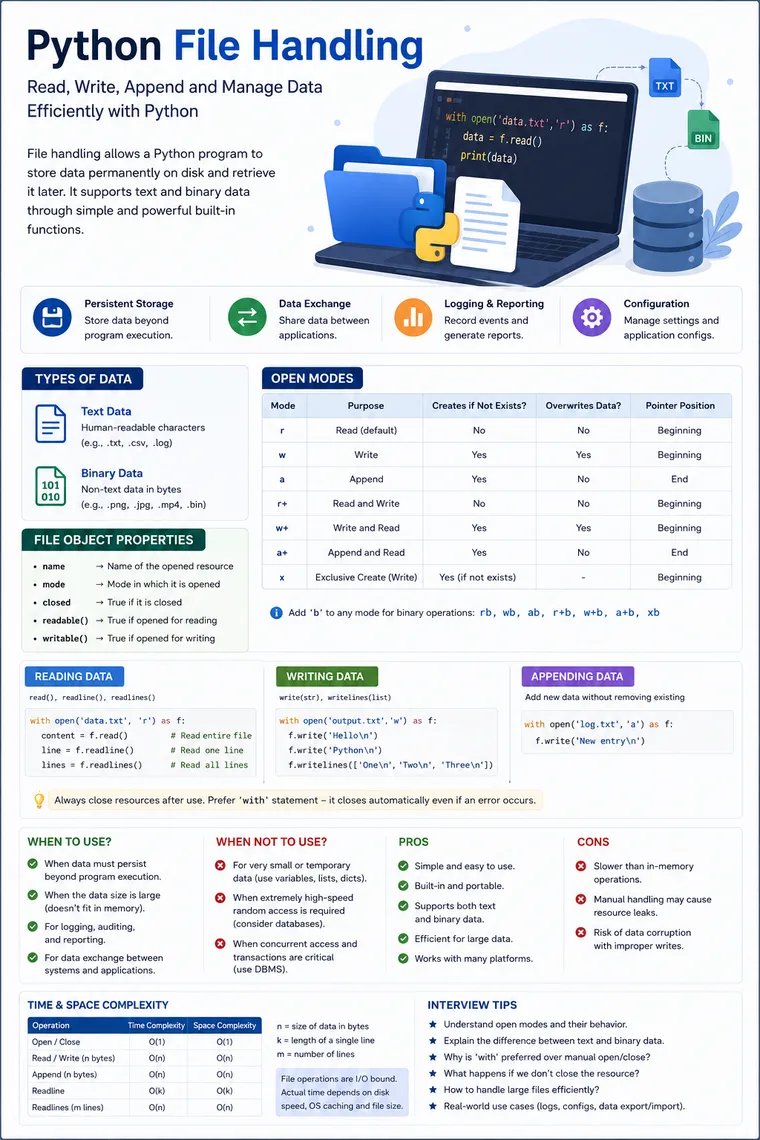
Python File Handling: From Basic I/O to Interview-Level Understanding
File handling is one of those Python concepts that looks simple at first—open(), read(), write(), and close()—but becomes much more important when you work with logs, configuration, reports, CSV data, uploaded documents, images, backups, and data-processing pipelines.
For a fresher, the goal is to understand how to read and write data. For an experienced developer, the important questions are which mode to choose, how much memory an operation consumes, how to process large files, how resource management works, and when a database or object-storage system is a better choice.
The concepts below cover the core areas in the supplied study material, including file modes, reading/writing, with, seek()/tell(), directories, CSV, ZIP, metadata, and object serialization.
1. What Is File Handling in Python?
A running Python program normally works with data in memory. When the process terminates, that in-memory data disappears.
When data needs to survive beyond the lifetime of the program, persistent storage is required. Files provide a simple way to store and retrieve such data.
Typical examples include:
- Application logs
- Configuration files
- CSV exports
- Reports
- Text documents
- Images and videos
- Machine-learning datasets
- Temporary processing data
- Backup files
Think of the architecture like this:
Python Application │ ▼ File Object │ ▼Operating System │ ▼Storage Device │ ├── SSD ├── HDD └── Network StorageAn important interview point is that Python’s file object is an abstraction over an operating-system resource. File operations ultimately involve I/O, so they are fundamentally different from operations on an in-memory list or dictionary.
2. Text vs Binary Data
There are two major ways to work with file data.
Text Data
Text data represents characters and is generally decoded into Python str objects.
Examples:
.txt.csv.log.json.xml.htmlExample:
with open("message.txt", "r", encoding="utf-8") as file: content = file.read()Here:
Storage bytes ↓Decoder ↓Python strThe encoding parameter is particularly important in production applications because the same byte sequence can represent different characters under different encodings.
Binary Data
Binary mode works with raw bytes.
Examples:
.jpg.png.mp3.mp4.pdf.zip.binExample:
with open("photo.jpg", "rb") as file: data = file.read()The result is a bytes object rather than a str.
The study material demonstrates binary reading/writing using modes such as rb and wb.
Interview Question
Why can’t we normally open an image using text mode?
Because an image contains arbitrary binary bytes that are not necessarily valid text encoded using the expected character encoding.
3. Understanding open()
The fundamental API is:
open(file, mode="r", buffering=-1, encoding=None, errors=None, newline=None)The most commonly used modes are:
| Mode | Meaning | Creates if missing? | Existing content |
|---|---|---|---|
r | Read | No | Preserved |
w | Write | Yes | Truncated |
a | Append | Yes | Preserved |
r+ | Read + write | No | Preserved |
w+ | Write + read | Yes | Truncated |
a+ | Append + read | Yes | Preserved |
x | Exclusive creation | Yes | Fails if exists |
These behaviors are central interview topics and are covered in the supplied material.
The Most Important Difference: w vs a
w — overwrite
with open("log.txt", "w") as file: file.write("Application started\n")If log.txt already contains:
Old entryAnother entrythe previous contents are removed.
Result:
Application starteda — append
with open("log.txt", "a") as file: file.write("Application started\n")Existing content remains and the new content is added.
This distinction is one of the most common Python interview questions.
4. Writing Data
Python provides two important methods for writing text:
write()writelines()The supplied material demonstrates both approaches.
write()
with open("employees.txt", "w", encoding="utf-8") as file: file.write("101,Harsha,Developer\n") file.write("102,Ravi,Tester\n")write() writes one string at a time.
writelines()
employees = [    "101,Harsha,Developer\n",    "102,Ravi,Tester\n",    "103,Anita,Manager\n"]
with open("employees.txt", "w", encoding="utf-8") as file:    file.writelines(employees)
Important:
writelines()does not automatically add newline characters.
If your strings don’t contain \n, they may be written continuously.
5. Reading Data
Python provides several reading methods:
read()read(size)readline()readlines()These are covered in the source material.
read()
Reads the requested content, or the entire remaining content if no size is supplied.
with open("data.txt", "r", encoding="utf-8") as file: content = file.read()Memory consideration
If the file is 5 GB:
content = file.read()you are asking Python to construct a huge in-memory representation.
That can become a serious memory problem.
read(size)
with open("data.txt", "r", encoding="utf-8") as file: chunk = file.read(1024)This reads up to a specified amount of data.
This technique is useful for chunk-based processing.
readline()
with open("application.log", "r", encoding="utf-8") as file: line = file.readline()Useful when processing one line at a time.
readlines()
with open("data.txt", "r", encoding="utf-8") as file: lines = file.readlines()This returns a list containing the lines.
For a very large file, this may consume considerable memory.
6. The Best Way to Read a Large File
Instead of:
with open("huge.log", encoding="utf-8") as file:    lines = file.readlines()
for line in lines:    process(line)
prefer:
with open("huge.log", encoding="utf-8") as file: for line in file: process(line)This is one of the most important differences between beginner-level and production-level Python.
The file object is iterable, allowing data to be processed progressively rather than loading the entire file into memory.
Memory comparison
read()   ↓Entire file → Memory
for line in file:   ↓Small portion → MemorySmall portion → MemorySmall portion → Memory
For large datasets, this can dramatically reduce peak memory consumption.
7. Why with open() Is Preferred
You can manually manage a file:
file = open("data.txt", "r")
try:    data = file.read()finally:    file.close()
But Python provides a cleaner approach:
with open("data.txt", "r") as file: data = file.read()The with statement uses the context-manager protocol and ensures that the resource is cleaned up when execution leaves the block, including when an exception occurs.
Production rule
Prefer:
with open(...) as file:over:
file = open(...)...file.close()when practical.
8. File Object Properties
Once a file is opened, the returned object provides useful information.
with open("data.txt", "w") as file: print(file.name) print(file.mode) print(file.closed) print(file.readable()) print(file.writable())Common properties and methods include:
| Attribute / Method | Purpose |
|---|---|
name | File name/path |
mode | Opening mode |
closed | Whether resource is closed |
readable() | Whether reading is supported |
writable() | Whether writing is supported |
These properties are explicitly demonstrated in the source material.
9. tell() and seek()
A file object maintains a current position.
tell()
Returns the current position.
with open("data.txt", "r") as file:    print(file.tell())
    print(file.read(5))
    print(file.tell())
The supplied material demonstrates how reading changes the current cursor position.
seek()
Moves the file position.
with open("data.txt", "r") as file: file.seek(10) print(file.read(5))Conceptually:
0 1 2 3 4 5 6 7 8 9 10 11 12 ... ↑ seek(10)Interview question
What is the difference between seek() and tell()?
Simple answer:
tell() → tells where the cursor isseek() → moves the cursor10. Checking Whether a Path Is a File
The os module provides filesystem utilities.
For example:
import os
if os.path.isfile("data.txt"):    print("File exists")else:    print("File does not exist")
The source material demonstrates os.path.isfile() for this purpose.
In modern Python applications, pathlib is often preferred for cleaner path-oriented code:
from pathlib import Path
path = Path("data.txt")
if path.is_file():    print("File exists")
11. Working with Directories
Python can also work with directories.
Common operations include:
os.getcwd()os.mkdir()os.makedirs()os.rmdir()os.rename()os.listdir()os.walk()The supplied material covers creating, deleting, renaming, and listing directories.
Example:
from pathlib import Path
logs = Path("logs")logs.mkdir(exist_ok=True)
for item in logs.iterdir():    print(item)
listdir() vs walk()
A classic interview question:
os.listdir()
Returns entries directly inside the specified directory.
os.walk()
Traverses the directory tree and can visit nested directories.
The distinction is covered explicitly in the source material.
Conceptually:
project/│├── app.py├── config.json│└── logs/ ├── app.log └── archive/ └── old.loglistdir() → immediate entries
walk() → can traverse the complete tree.
12. CSV Processing
CSV means Comma-Separated Values and is commonly used for tabular data exchange.
Python provides the csv module for reading and writing CSV data.
Writing
import csv
employees = [    [101, "Harsha", "Developer"],    [102, "Ravi", "Tester"],]
with open("employees.csv", "w", newline="", encoding="utf-8") as file:    writer = csv.writer(file)
    writer.writerow(["ID", "Name", "Role"])    writer.writerows(employees)
Reading
import csv
with open("employees.csv", "r", newline="", encoding="utf-8") as file:    reader = csv.reader(file)
    for row in reader:        print(row)
Interview point
Don’t manually construct CSV strings with:
file.write(f"{id},{name},{salary}\n")for non-trivial CSV processing.
CSV has quoting, delimiters, embedded commas, newline handling, and other edge cases. The csv module exists to handle these correctly.
13. Binary File Handling
For binary data:
with open("source.jpg", "rb") as source: with open("copy.jpg", "wb") as target: while chunk := source.read(1024 * 1024): target.write(chunk)This is better than:
data = source.read()for very large files because the chunked approach limits peak memory usage.
Important modes
rb → read binarywb → write binaryab → append binaryYou can combine binary mode with read/write modes:
r+bw+ba+bThe supplied material specifically introduces binary modes by adding b to the normal modes.
14. File Metadata
Python can retrieve filesystem metadata using os.stat().
import os
stats = os.stat("data.txt")
print(stats.st_size)print(stats.st_atime)print(stats.st_mtime)
The source material discusses attributes such as file size, access time, modification time, ownership-related information, and other filesystem metadata.
For modern code, pathlib can make common metadata operations simpler:
from pathlib import Path
path = Path("data.txt")
print(path.stat().st_size)
15. ZIP Files
Python includes the zipfile module for creating and reading ZIP archives.
The supplied material highlights three practical benefits:
- Reduced storage size for compressible data
- Reduced transfer size
- Convenient packaging of multiple files
It also introduces ZipFile for ZIP operations.
Example:
from zipfile import ZipFile, ZIP_DEFLATED
with ZipFile("backup.zip", "w", ZIP_DEFLATED) as archive:    archive.write("data.txt")    archive.write("config.json")
Reading:
from zipfile import ZipFile
with ZipFile("backup.zip", "r") as archive:    print(archive.namelist())
16. Pickling and Unpickling
Python’s pickle module can serialize Python objects.
Python Object │ │ pickle.dump() ▼Serialized representation │ │ pickle.load() ▼Python ObjectThe supplied material introduces:
- Pickling → writing an object’s state
- Unpickling → reconstructing the object
pickle.dump()pickle.load()FILE+HANDLING+STUDY+MATERIAL.pdfPDF
Example:
import pickle
data = {    "id": 101,    "name": "Harsha",    "role": "Developer"}
with open("employee.pkl", "wb") as file:    pickle.dump(data, file)
Read it:
with open("employee.pkl", "rb") as file:    employee = pickle.load(file)
print(employee)
Critical security interview point
Never unpickle untrusted data.
pickle.load() can execute arbitrary Python-related behavior during object reconstruction. Therefore, it should not be treated as a safe interchange format for data received from unknown users or external systems.
For interoperable application data, formats such as JSON are generally safer choices.
17. Time Complexity and Space Complexity
File operations require a slightly different way of thinking about complexity.
Let:
n= number of bytes processedk= number of bytes read in one operationm= number of lines processed
| Operation | Approx. Time | Extra Space |
|---|---|---|
open() / close() | O(1)* | O(1) |
read(k) | O(k) | O(k) |
write(k) | O(k) | O(k)** |
read() entire file | O(n) | O(n) |
readlines() | O(n) | O(n) |
| Iterate line-by-line | O(n) | O(line/chunk size) |
seek() | Usually O(1)* | O(1) |
tell() | Usually O(1)* | O(1) |
os.listdir() | O(d) | O(d) |
os.walk() | O(d + f)*** | O(depth + metadata) |
* Actual performance depends on the filesystem, OS, device, buffering, remote storage, and implementation.
** Python/runtime and OS buffering can introduce additional memory beyond the data itself.
*** d = directories/entries traversed and f = files encountered; practical cost depends heavily on filesystem traversal.
Most important interview statement
File I/O is generally I/O-bound rather than CPU-bound.
Therefore, theoretical Big-O alone doesn’t tell the whole performance story.
Actual performance can depend on:
SSD/HDD speedNetwork latencyFilesystemOperating systemBuffer sizeFile sizeEncoding/decodingCompressionPython runtime18. read() vs Streaming: The Real Performance Decision
Suppose a 10 GB log file needs to be processed.
Approach 1
data = file.read()Conceptually:
10 GB file ↓10 GB+ memory pressurePotentially dangerous.
Approach 2
for line in file: process(line)Conceptually:
10 GB file ↓small portion ↓process ↓discard ↓next portionThis changes the space complexity from approximately O(n) to O(k) where k represents the amount of data held at a time.
That is an excellent interview discussion point because it connects Python syntax to system-design thinking.
19. Advantages of File Handling
Pros
1. Simple
Python provides straightforward APIs:
open()read()write()close()2. Persistent
Data survives after the Python process terminates.
3. Good for large sequential data
Streaming allows processing without loading the entire dataset into memory.
4. Supports different data types
Text and binary formats can both be handled.
5. Useful for interoperability
CSV, JSON, text, and other formats can be exchanged between applications.
6. Built into Python
No external package is required for basic filesystem operations.
20. Disadvantages
Cons
1. Slower than in-memory operations
Disk and network I/O are much slower than accessing RAM.
2. Limited query capabilities
Searching a large text file is fundamentally different from querying an indexed database.
3. Concurrency becomes harder
Multiple processes or threads modifying the same file can introduce consistency problems.
4. Manual data management
You may need to handle:
- Locking
- Corruption
- Partial writes
- Permissions
- Recovery
- Rotation
- Backup
5. Poor fit for transactional workloads
A database is generally more appropriate when you need transactions, constraints, indexing, concurrent updates, and complex queries.
21. When Should You Use Files?
Files are a good choice when:
Configuration
config.json.envapplication.propertiesLogs
application.logerror.logaudit.logData exchange
CSVJSONXMLReports
monthly_report.csvsales_report.xlsxLarge sequential processing
Large log ↓Read chunk ↓Process ↓Write resultBinary assets
ImagesPDFsAudioVideoArchives22. When Shouldn’t You Use Files?
Don’t automatically use a file simply because you need persistence.
Consider a database when you need:
Complex queriesIndexesTransactionsConcurrent updatesRelationshipsConstraintsHigh-frequency reads/writesFor example, storing millions of customer records in:
customers.txtand repeatedly searching it is usually a poor architectural decision.
A database provides:
Application ↓Database ├── Index ├── Query Engine ├── Transactions ├── Concurrency Control └── PersistenceSimilarly, for cloud-scale binary assets, object storage is often more appropriate than treating a local disk as the primary storage layer.
23. Common Mistakes Developers Make
Mistake 1 — Using w accidentally
open("important.txt", "w")This can truncate existing data.
Mistake 2 — Loading huge files into memory
data = file.read()Use streaming/chunking when appropriate.
Mistake 3 — Forgetting resource cleanup
Prefer:
with open(...) as file:Mistake 4 — Ignoring encoding
Instead of relying on environment defaults:
open("data.txt")prefer explicitly specifying the expected encoding when appropriate:
open("data.txt", encoding="utf-8")Mistake 5 — Treating CSV as ordinary strings
Use:
csv.readercsv.writerrather than manually splitting/concatenating complex CSV data.
Mistake 6 — Using pickle with untrusted input
Never deserialize arbitrary external data using pickle.
24. Real-World Example: Log Processing
Imagine an e-commerce application generating:
5 GB application log per dayA naive approach:
with open("app.log") as file:    data = file.read()
errors = data.count("ERROR")
This may require a very large memory allocation.
A better approach:
error_count = 0
with open("app.log", encoding="utf-8") as file:    for line in file:        if "ERROR" in line:            error_count += 1
print(error_count)
Complexity
If n is the total amount of log data:
Time → O(n)Space → O(1) additional working memoryignoring the memory required by the runtime’s buffering and the size of individual lines.
This is exactly the type of answer that demonstrates practical experience during an interview.
25. Fresher vs Experienced Developer Perspective
Fresher should know
open()r / w / aread()readline()readlines()write()writelines()close()withExperienced developer should additionally know
Text vs binaryEncodingBufferingStreamingChunk processingFile descriptorsResource managementConcurrencyFile lockingAtomic writesFilesystem limitationsPermissionsCSV handlingSerialization risksFile metadataDirectory traversalWhen to use a DB/object storage insteadI/O-bound performanceThe difference is not simply knowing more APIs.
It is knowing why a particular approach is appropriate.
26. Interview Questions You Should Be Ready For
Basic
1. What does open() return?
A file object that provides an interface for interacting with the underlying resource.
2. What is the difference between r, w, and a?
r → readw → write + truncate/createa → append/create3. What happens if you open an existing file using w?
Existing contents are truncated.
4. What happens if a file doesn’t exist and you use r?
A FileNotFoundError is raised.
These behaviors are covered in the source material.
Intermediate
5. Why is with open() preferred?
Because context management ensures proper resource cleanup, including exception paths.
6. Difference between read() and readlines()?
read() → returns content as one string/bytes objectreadlines() → returns lines as a list7. Difference between readline() and iterating over a file?
readline() explicitly retrieves one line per call, while iteration provides a convenient streaming interface over the file.
Experienced-level
8. How would you process a 100 GB file on a machine with 8 GB RAM?
Don’t load the whole file. Stream it line-by-line or process it in bounded-size chunks.
9. Why can file processing be slow even when the algorithm is O(n)?
Because the dominant cost may be I/O latency and throughput rather than CPU computation.
10. File or database—which would you choose?
It depends on access patterns. Files are appropriate for sequential storage, logs, exports, configuration, and simple persistence. Databases are preferable for concurrent transactional access, indexing, relational queries, and high-volume structured workloads.
11. Why shouldn’t untrusted data be loaded with pickle?
Because pickle is not designed as a safe format for untrusted input.
12. How would you copy a 20 GB binary file efficiently?
Use binary mode and bounded chunks rather than reading the entire file into memory.
27. Quick Interview Cheat Sheet
open()       → obtain file object
r            → readw            → write / truncatea            → appendr+           → read + writew+           → write + read / truncatea+           → append + readx            → exclusive creation
rb           → binary readwb           → binary write
read()       → read contentread(n)      → read up to n unitsreadline()   → one linereadlines()  → all lines as list
write()      → write stringwritelines() → write iterable of strings
tell()       → current positionseek()       → move position
with open()  → automatic resource management
os.path      → filesystem utilitiesos.walk()    → recursive directory traversal
csv          → CSV processingzipfile      → ZIP archivespickle       → Python object serialization
Large file:stream/chunk → lower memory usage
Final Takeaway
Python file handling is not merely about memorizing:
open()read()write()close()The real engineering skill is understanding the relationship between persistence, I/O, memory, performance, resource management, and application architecture.
For interviews, remember this progression:
Basic ↓open/read/write ↓Modes ↓with / context managers ↓Text vs Binary ↓Streaming & chunking ↓seek / tell ↓Directories & metadata ↓CSV / ZIP / serialization ↓Complexity ↓I/O performance ↓File vs Database vs Object Storage